
General rules
Events metadata menu includes the following tabs:
- General information
- Flow
- Parameters
The metadata fields appearing in the General Information tab expansion include the following:
- Name – text describing the event, which can optionally be presented in the process graph
- Number – the symbol number within the process graph. The number is not presented on the graph, but is available within the Definition of the process
- Description - Can only contain descriptive text that appears as designer documentation. The description that appears in a throwing event should not generally be duplicated in its associated catching event. In this case, this field only appears in catching events that do not have associated throwing events.
Flow tab metadata defines the semantics of the event's input and output flows.
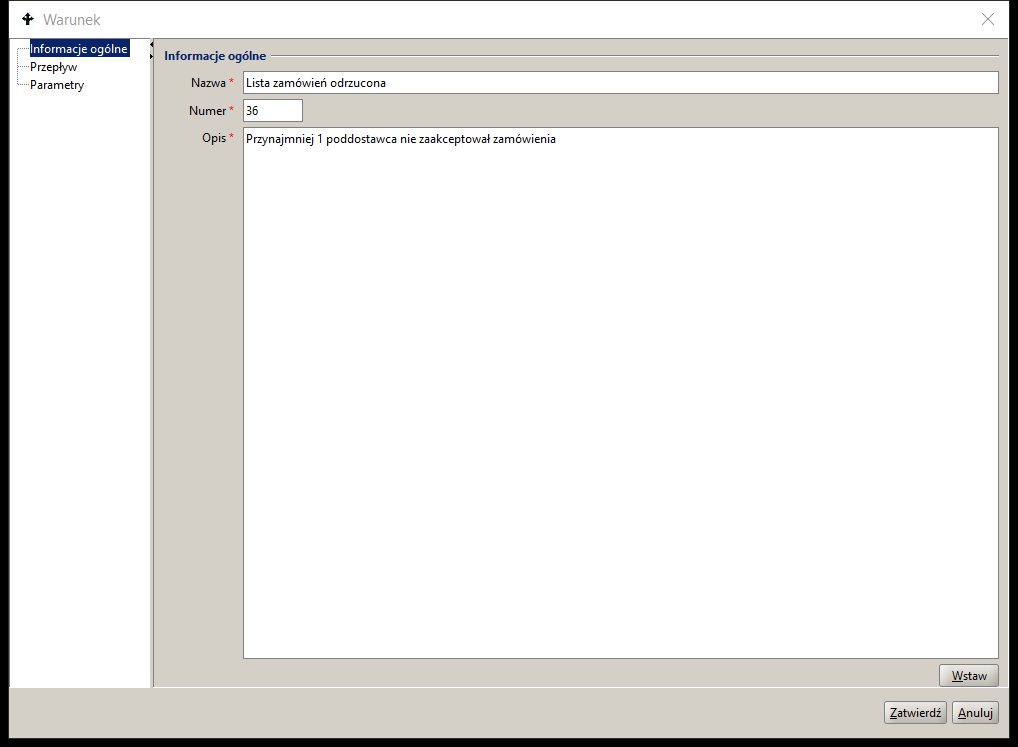
Figure 1. Event metadata
Parameters tab metadata contains the following elements:
- Type identifier (event Kind) for throwing and catching events. The value is assigned automatically based on the selected event graphic symbol.
- Instance ID (eventId) throwing event and catching event. The parameter value allows to identify pairs of events in the process model structure.
- Content (eventContent) – the parameter appears in events such as Message, Escalation and Signal. The field is used to pass content. It can be the value of the specified global process variable of the String type or explicitly written content.
- Process Instance ID (toProcessInstId) available as value a global variable of type String or a BPQL expression that was evaluated by the system when the process/subprocess instance was instantiated.
- Process Identifier (toProcessId) value chosen as a unique identifier of the object processed within the process/subprocesses structure. The value is passed as an input parameter (in) to the top-level process and is available throughout the process/subprocess hierarchy structure as the value of the global variable $name.
- Activity Id (toActivityId) value of type String is generated as the activity number during process model development.
- Activity Instance Id (toActivityInstId) available as value a global variable of type String or a BPQL expression that was evaluated by the system when the activity instance was initiated.
The event parameter configuration is created during process modeling and all parameters except the type identifier, event instance identifier and process identifier are optional.
In case of autonomous events (i.e. without matching throwing events) the Condition and Timer parameters convey semantic information, such as for example for the Timer event, definition of the time parameters and for the Condition event the BPQL conditional expression.
The event parameters are implemented by the BPMN 2 event definition expression. For multiple events, an expression is defined for each selected event type.
An event definition based on a BPQL expression allows for the evaluation of conditions based on referenced data stored in different data sources;
- Global variables stored as container elements
- Local variables defined within the BPQL statement block defining the event semantics
- The values of the fields of the electronic form representing the main process object are selected directly or from the respective XML file using the XPath queries.
- Topic Maps ontology attribute values available directly or via TMSL queries
- Values of relational database attributes materialized with the use of SQL queries
Table 1 provides a summary of all event types available in the docuRob® Workflow platform*.* The event groups are presented in the order of the main menu of the process design tool.
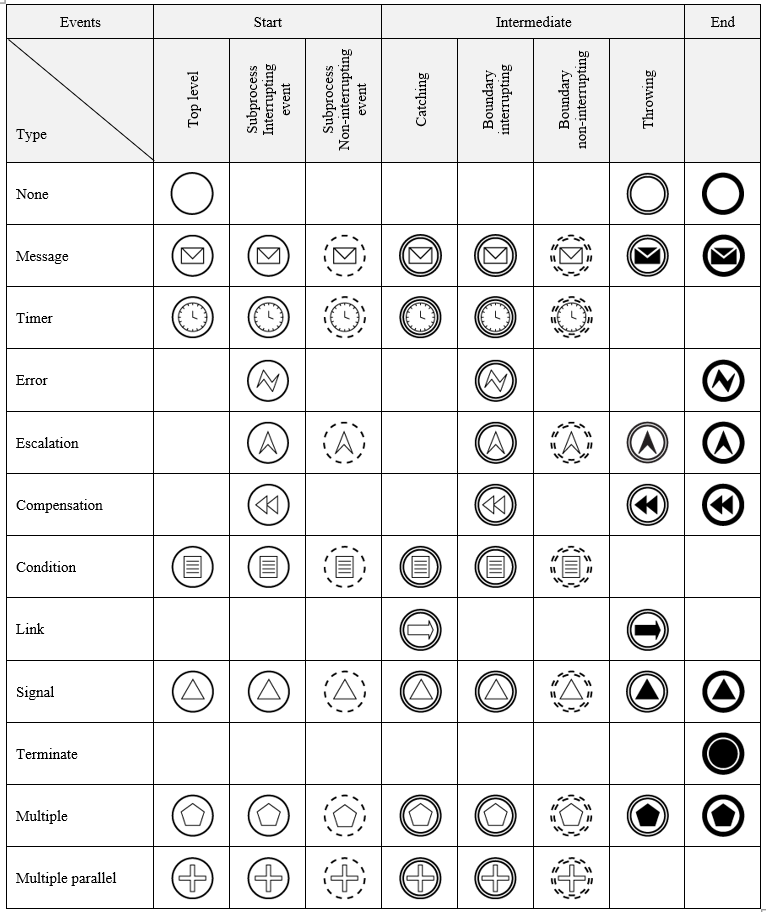
Table 1. Summary table of event types
Start events
Start events instantiate the top-level process instance and the Event-driven subprocesses defined within its scope. They are the starting point for the flows that occur in the process. The start event can have no incoming flows and it is the source of only one outgoing flow.
In the case of the compound activities (marked with the symbol +), the start event of the Subprocess is an event without type. The definition of the start event is mandatory if an end event has been defined within the process.
The creation of a process instance can also be caused by the definition of an activity that has no incoming flows and is only a source of outgoing flows.
Top-Level Process Activation Rules
- A single start event creates an instance of the process each time it occurs.
- An exception to the above rule is the Receive Message task.
- For Multiple Start Events the following scenarios apply:
- Multiple event instantiates exactly one instance of the process based on the event currently occurring. It does not wait for other events.
- Parallel Multiple event may activate a process after the first event occurs. A process instance can be terminated after receiving and processing all the remaining defined events, which can be fired at any time during the execution of the process instance.
- A process instance can be terminated when the end element, that is, a task or an end event, has received all the tokens produced within that process instance.
Event-driven Subprocess Activation Rules
- An Event-driven subprocess is always activated when the start event of its enclosing process occurs and it waits to receive its start event trigger.
- A subprocess can only be activated when the enclosing Process/Subprocess is active. It is possible to activate multiple instances of non-interrupting Event-driven subprocesses while the enclosing process is executing. In the case of interrupting subprocesses, execution can only occur once.
- If an Event-driven Subprocess starts on an Error event, the enclosing Process/Subprocess completes the emergency interrupt after the event handler completes.
- If an Event-driven Subprocess starts for an interrupting event other than an Error (e.g. Escalation ), the enclosing Process/Subprocess enters the Terminating state and waits for the event handler to complete.
- Event-driven processes/subprocesses cannot have boundary events.
- A Subprocess either interrupts or does not interrupt the enclosing Process/Subprocess instance but always executes in its context. This also implies full access to values of the global variables.
- An Event-driven subprocess can re-trigger the event that caused its initiation by repeating it as a terminal event to enable further processing based on the boundary event of the encompassing Process/Subprocess.
Intermediate events
Intermediate events are placed anywhere in the process flow structure except of its beginnings and ends. They can also concern events associated with process activities, both elementary and compound, defined in the model as intermediate boundary events.
Intermediate catching events are used within the normal flow structure. After receiving a token, the catching event is activated and it subsequently waits to be triggered by the corresponding throwing event. After the event handler is executed, the token is moved according to the flow to the next activity.
Throwing events that target an Event Sub-process pass the token along on all outgoing flows.
Intermediate boundary events are activated when a token is received by the elementary or compound activity on whose boundary they are placed. The trigger that starts a boundary event is thrown by its corresponding throwing event or, as in the case of the Timer and Condition events, it is executed when the corresponding time or logical condition is met.
The trigger is propagated from the throwing event to the appropriate boundary event attached to the nearest activity that contains the throwing event (e.g., a process or subprocess). If no corresponding catching event is found the throwing event is left unhandled. Events placed on the boundary of an activity can be interrupting or non-interrupting.
Rules for the execution of intermediate events
- An intermediate throwing event, upon receiving an activating token, creates and sends a trigger according to the event description contained in its definition*.* Immediately after the above operation is performed, the token is passed on to the next activity.
- The catching event receives an activating token and waits to receive a trigger from the associated throwing event. After receiving the trigger the catching event passes the token to the next activity indicated by its outgoing flow.
Intermediate Boundary Event Execution Rules
- Interrupting boundary events cause the cloned token pass thru the exception flow, or flows. Execution of the associated activity is terminated and its token is consumed.
- Non-interrupting boundary events receive a cloned token and at the same time the execution of the associated activity continues. After each of these elements has completed their execution, the tokens are sent over the appropriate outgoing flows.
End events
End events close the process flow and cannot have any outgoing flows. If the end event occurs in a Process/Subprocess, then at least one Start event must occur at the same level. With the exception of the Terminate event, other end events can only be executed when there are no more active activities in the Process/Subprocess*,* i.e. there are no more tokens in its structure*.* The end event consumes subsequent tokens arriving at it until the flow of all tokens generated within this level is completed. The exceptions are tokens that are consumed within activities interrupted by intermediate boundary events. This also applies to Start interrupting events in Event-driven subprocesses.
Process/Subprocess Termination Rules
- In case of the Termination end event, the instance of the Process/Subprocess that includes it is terminated. Other instances of this process are not terminated. All activities occurring in this process instance are terminated, including Compensation and Event-driven Subprocess.
- For all other end events, the activity is determined by the trigger type, and the process instance is terminated only when the following two conditions are true:
- All events that were part of the Start Multiple Parallel Event were fired.
- There is no token in this process instance.
Event-driven Subprocess Termination Rules
In case of the Terminate event its subprocess instance is terminated. Other instances of this subprocess as well as instances of subprocesses at a higher level in the hierarchy and the top-level process instance are also terminated.
For all other end events, the activity specified by the trigger type occurs, while the subprocess instance is terminated only when the following two conditions are true:
- All subprocess start events were fired ( Multiple Parallel Event ).
- There is no token in this subprocess instance.
Types of events
Event without trigger type
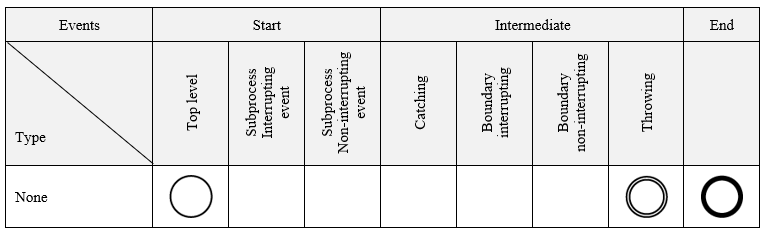
Table 2. Event without trigger type
Starting Top Level
The event is initiated by the createProcessInstance service available in the docuRob®WorkFlow platform API*.* The result is creation of a new top-level process instance based on the specified Process/Subprocess definition, for the specified User, taking into account the input parameters and an optional reference to an external data container
An Event is optional at the top-level Process or Sub-Process level defined within the flow structure of an enclosing Process. The Start event and its corresponding End event are independent of other levels of the process hierarchy.
All Flow Objects that do not have incoming flows are activated within the instantiation of the encompassing process.
The event is used to instantiate subprocesses receiving a token within the defined flow structure of the encompassing Process/Subprocess. A subprocess is an element of a hierarchy of subprocesses defined within the top-level process and it is started within a compound activity that is distinguished by the + marker.
Intermediate throwing
An untyped throwing event can only occur within the normal Process/Subprocess flow structure. The event does not fire any trigger and can be used (e.g. in a log) to signal the current state of the process.
End throwing
The termination event interrupts the execution of the process instance path according to the adopted Process/Subprocess termination algorithm and does not throw any trigger.
Message
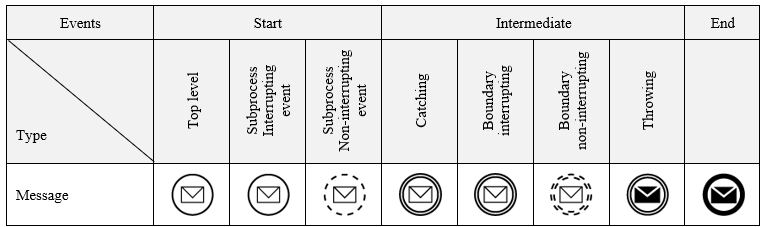
Table 3. Message
A message may be sent by another, external Process/Subprocess that is not hierarchically related to the same top-level Process, i.e. the related throwing event may be placed within the flow structure of another top-level Process, and/or its hierarchically related Sub-Processes.
Startup – the highest level process
Upon receiving the message, the docuRob®WorkFlow platform starts a new instance of a Process containing the Start task of type Message.
Start interrupting - Event-driven subprocess
Upon receipt of the expected Message, the Start event causes the execution of the Event-driven Subprocess to begin*,* while simultaneously initiating the termination of the Process/Subprocess within which the given subprocess is defined. The environment of the encompassing Process/Subprocess is available until the initiated Event-driven Subprocess is terminated*.*
Starting non-interrupting – Event-driven subprocess
Upon receiving the expected Message, the Start event causes the execution of the Event-driven Subprocess to begin*.* At the same time, the Subprocess containing the throwing event continues execution.
Intermediate catching
After receiving the Message the process continues. In case of an interrupting boundary event the token is passed on via the exception flow and, in case of a non-interrupting event, also via the normal flow, after the associated activity has completed.
Intermediate throwing
Sending a Message to another Process/Subprocess that is not related within the hierarchy of the current (sending) Process/Subprocess. After sending the Message, the process flow continues according to the definition of normal flows.
End Throwing
Sending a Message to an external catching process, subprocess or information system that initiated the process being terminated. None of the above elements can belong to the same top-level Process hierarchy.
Timer
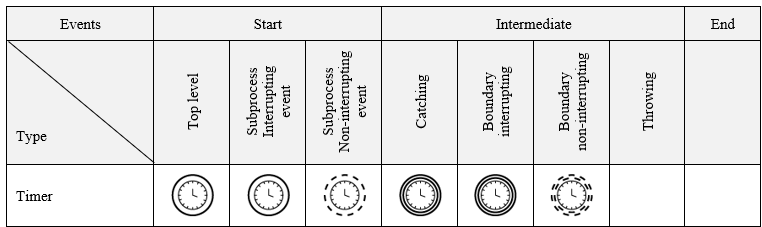
Table 4. Timer
After receiving a token as a part of the execution of the Process/Subprocess instance that includes it, the Timer Catching event waits for a defined time condition to be met*.*
The event waits for a specified period of time to elapse. It can be defined in three ways:
- absolute: a specific number of days, hours, minutes and seconds
- or: a specific date and/or time that must pass (e.g. Friday 15:50:59 or 25th of the month 07:59:59)
- dynamically: using a BPQL expression. The expression must return the wait time in milliseconds. It is evaluated anew each time the Timer event is fired (e.g. in loops).
Start – the highest level process
Once the time condition specified in the event definition is met, the docuRob®WorkFlow platform starts a new instance of type Process with a Start event of type " Timer ".
Start interrupting - Event-driven subprocess
After the time condition specified in its definition is met, the Start event starts the execution of the Event-driven Subprocess and simultaneously initiates the completion of the execution of the Process/Subprocess within which the given subprocess is defined.
Starting non-interrupting – Event-driven subprocess
After the time condition specified in its definition is met, the start event causes the execution of the Event-driven Subprocess to begin. At the same time, the Process/Subprocess continues its execution.
Intermediate
The Timer catching event is initiated upon receiving a token within the normal flows or in the case of a boundary event together with its associated activity. After meeting the time condition specified in its definition, the intermediate event passes the token through a normal flow. In the case of an interrupting boundary event, the associated activity is terminated and the token is passed through an exception flow. A non-interrupting boundary event allows the associated activity to continue and the tokens will be passed on through the normal activity flows and the exception flows of the boundary event, respectively.
Error
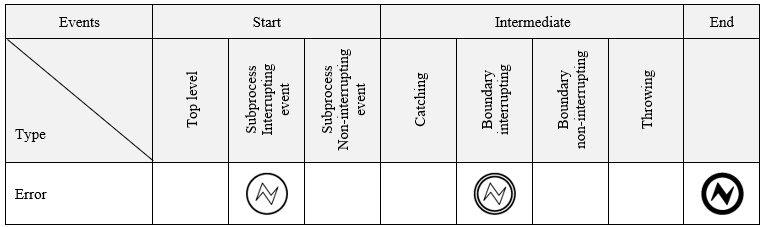
Table 5. Error
An event of type Error is always an interrupting event because it is initiated after an error occurs that causes execution to be interrupted. The token is passed by the exception flow.
Start interrupting - Event-driven subprocess
Starts an error handling Subprocess waiting for a trigger generated by the corresponding throwing event defined in the enclosing Process/Subprocess. Due to the nature of the error event, it always results in the interruption of the enclosing Process/Subprocess.
Intermediate boundary
The event receives a trigger related to a specific error type or, if none is specified, triggers related to errors of any type. The catching event occurs exclusively in the interrupting form. Upon receiving the trigger, the event interrupts the execution of the associated activity.
End Throwing
This type of end event generates a named error message that occurred in the Subprocess being closed*.* All currently executing paths of the subprocess are terminated.
Escalation
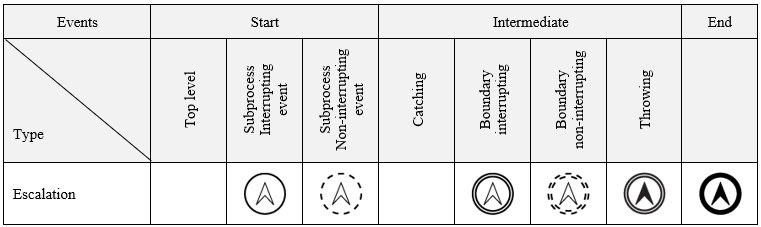
Table 6. Escalation
Start interrupting - Event-driven subprocess
After receiving the token the Start event initiates execution of an Event-driven Subprocess instance while simultaneously commencing the completion of the Process/Subprocess within which the given Event-driven Subprocess is defined.
Starting non-interrupting – Event-driven subprocess
After receiving the token the Start event causes the execution of the Event-driven Subprocess to begin*.* At the same time, the Process/Subprocess containing the throwing event continues to execute.
Intermediate boundary
The interrupting Escalation event interrupts the execution of the associated activity and the token is passed on the exception flow.
The non-interrupting Escalation event does not interrupt the execution of the associated activity, and an additional token is generated and passed on the exception flow.
Intermediate throwing
Occurs within the normal flow structure of a Process/Subprocess and fires a catching Escalation event upon receiving a token. The target event can be an interrupting or non-interrupting boundary event or a Start event of an Event-driven sub-process
End Throwing
The End Escalation throwing event terminates the instance of the containing Process/Subprocess and fires the associated catching event placed in the higher-level Process/Subprocess that calls the Subprocess.
Compensation
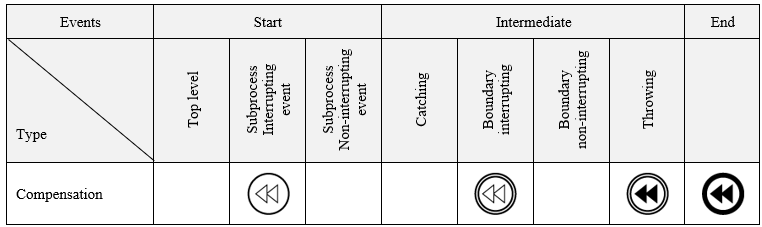
Table 7. Compensation
The compensating activity is intended to reverse the effects of activities performed automatically or tasks performed by the User as well as Subprocesses associated with them via a catching event Compensation. The association between an activity and its compensating activity is defined by an association represented in the process graph as a dashed line. Compensation applies only to activities that have been performed and have been completed correctly. Compensation events associated with an activity that ended with an error or has not been instantiated are ignored. Catching Compensation events are modeled solely as interrupting events because the Activities associated with them must already be completed.
The Activity Compensation handler can be implemented as an automatic activity or a Subprocess not included the flow structure of the enclosing Process/Subprocess or as an Event-driven Subprocess started by the Start catching Compensation event.
In the first case, the Activity or the Sub-process of the type Compensation are specified with a marker and linked to the compensated activity via a boundary catching interrupting event, to be triggered by the corresponding throwing event, either Intermediate or End. On the other hand, the Event-driven Subprocess is to be commenced by its Start event of the type Compensation.
Handling Compensation is done synchronously, which means that the throwing event waits for the triggered activity to finish Compensation. Waiting for completion pertains to all types of the compensating activities and subprocesses, including Event-driven subprocesses.
Intermediate boundary
The event is activated when the associated activity receives a token and waits until its completion for a trigger to be thrown by the respective throwing event. If the conditions for starting the compensation handler are met, the associated Compensation type activity will be instantiated*.*
For a Multiple activity, each of the concurrent instances is compensated by the dedicated instance of the Compensation activity. Calling the compensating Event-driven Subprocess involves simultaneous compensation of all instances of the Multiple Activity.
Subprocess interrupting Start event
An event is activated when the including Process/Subprocess starts and it waits for a trigger generated by an Intermediate or End throwing event. Activation of an event creates an instance of the Event-driven Subprocess of the type Compensation responsible for the reversal of the effects of activities performed within the encompassing Process/Subprocess.
Intermediate throwing
The throwing Compensation event that occurs in the normal flow of the process graph triggers compensation activities via any catching event Compensation unless a specific catching event of this type has been addressed. In both of the above cases compensation handlers will be performed for activities that meet the following conditions:
- The intermediate throwing event is contained in the normal flow of the same level of Process/Subprocess
- The intermediate throwing event is contained in a Subprocess driven by the Compensation event, which is contained in the same Process/Subprocess level.
End Throwing
Termination of a process instance by the End throwing events of the type Compensation causes compensation activities to be triggered by any catching event unless a specific catching event has been addressed. In either case, compensation will be performed for activities that meet the following conditions:
- The End throwing event is contained in the normal flow of the same level of Process/Subprocess
- The End throwing event is contained in the Event-driven Subprocess "Compensation", which is contained in the same Process/Subprocess level.
Condition
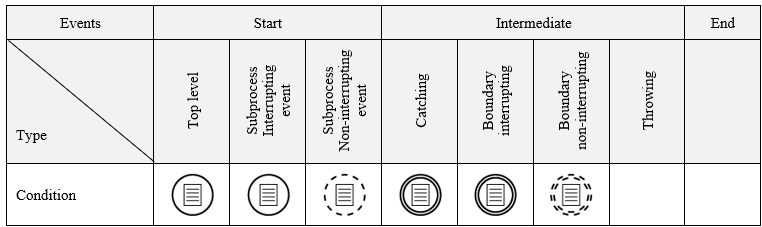
Table 8. Condition
After receiving a token the Condition event, occurring within the enclosing Process/Subprocess instance, waits for the defined logical condition to be met*.* A condition, the evaluation of which returns the logical value "true" or "false", is defined as a BPQL expression.
Start – the highest level process
Once the logical condition specified in the event definition is met, the docuRob® WorkFlow platform initiates a new instance of a Top-Level Process containing a Condition Start event. A BPQL expression can access data sources that exist outside the Top-Level Process being initiated, as well as static variables associated with its definition.
Start interrupting – Event-driven subprocess
If the logical condition is met the Start event of the type condition starts the execution of the Event- driven Subprocess and simultaneously initiates termination of the execution of the Process/Subprocess within which the given Subprocess is defined. In order to maintain the capability of accessing the context of the encompassing the Process/Subprocess, the instance termination phase is synchronous with the invoked Event-driven Subprocess.
Starting non-interrupting – Event-driven subprocess
If the logical condition is met, the Start event starts the execution of the Event-driven Subprocess. At the same time, the enclosing Process/Subprocess continues execution.
Intermediate catching
After receiving the token, the Condition event waits for the logical condition given in its definition to be met. Once the condition is met, the event sends the token on the matching outgoing flow.
Intermediate
The condition event is initiated after receiving the token within the normal flow or, in the case of a boundary event, together with its associated activity. When the logical condition is met, the intermediate event passes the token through the normal flow. In the case of an interrupting boundary event, the associated activity is terminated and the token is passed through an exception flow. A non-interrupting boundary event allows the associated activity to continue and the tokens will be passed both through the normal and the exception flows.
Link
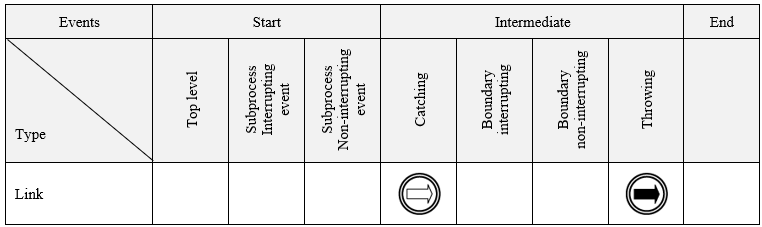
Table 9. Link
Intermediate events Link can be used within the normal flow structure of the same Process/Subprocess to connect parts of the process graph. The event substitutes long flow lines that may run between activities located in distant sections of the graph. A typical use can be to define process cycles that include many different BPMN 2 notation elements.
Intermediate catching
Multiple different throwing events of type " Link " may point to one catching event Link.
Intermediate throwing
The same throwing Link event can point to one catching Link event.
Signal
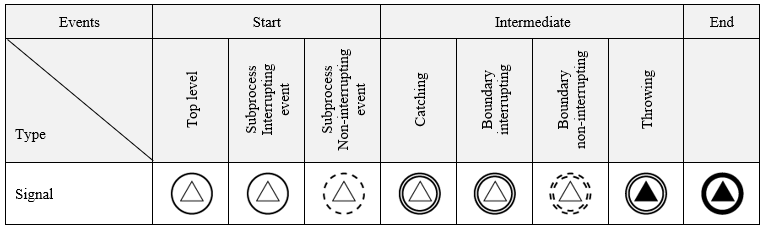
Table 10. Signal
Catching
The Top level process Start event Signal may initiate a Process instance, if it receives a trigger generated by an instance of another process or an external information system. Such an external throwing event can address many different Start events of different processes. The Signal catching event may receive the message content generated by the associated throwing event.
The interrupting Signal Start event initiates an instance of the Event-driven Subprocess and simultaneously interrupts the execution of an instance of the encompassing Process/Subprocess. The non-interrupting Signal Start event works similarly, but it allows the encompassing Subprocess instance to continue*.*
Activated Intermediate Signal events are catching triggers generated by throwing events occurring both within their scope of visibility and those generated by external processes and/or independent IT systems. Upon receiving a trigger the Boundary Catching events, except for interrupt-related or non-interrupt-related handling, pass the token through their outgoing exception flows.
Signal boundary events work analogously to the events initiating Event-driven Subprocesses, whereby they interrupt or not an instance of their parent activity. In the case of the interrupt option, the token is passed only on the exception flows coming from the event, whereas in the case of the parent activity continuation, the token is also passed on the normal flow upon its completion.
Intermediate throwing
After receiving the token, intermediate throwing events of the type Signal generate an appropriate trigger, which can be received by any Signal catching events of the same type that are in the active state, i.e. having received a token.
End throwing
The End throwing Signal events work analogously to the intermediate ones and additionally terminate the Process/Subprocess instance in accordance with the adopted constraints of the processing closure operations.
Terminate
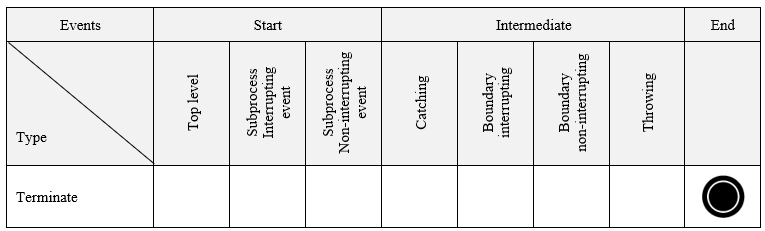
Table 11. Terminate
The Terminate event causes the process to be terminated immediately. This means that all activities, including all instances of Multiple Activities, will be unconditionally terminated. The process is terminated without performing any compensation or event handling.
Multiple
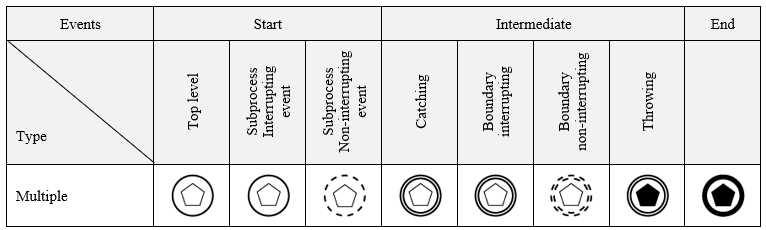
Table 12. Multiple
Multiple events contain more than one event definition and throw or catch their corresponding trigger types accordingly*.* In the case of the Start Events, their effect is to start a Process/Subprocess instance, while in the case of the Intermediate Boundary Events, they exit using exception flows in the case of the interrupting events or, for the non-interrupting events, exception flows and normal flows.
Start catching
Multiple Start events allow for the initiation of a Process/Subprocess instance according to the definitions of the individual events listed therein. The occurrence of just one of them is enough to create an instance of the Process/Subprocess.
Catching multiple Start events are handled in an analogous way for a Top-level Process and an Event- driven Subprocess. In the latter case, there can be two variants of Start events, i.e. an interrupting variant that causes the execution of the Process instance containing the Subprocess to be interrupted*,* and a non-interrupting variant that allows it to continue.
Intermediate catching
Multiple intermediate events occurring within the normal flow structure, upon receiving a token, listen for the matching throwing events according to the event definition list defined for them*.* After at least one of such events occurs the token is forwarded via the appropriate outgoing flows.
Intermediate throwing
An intermediate multiple throwing event, upon receiving the token, generates Triggers for all event definitions specified in its list.
End Throwing
If a Process/Subprocess is terminated with the Multiple throwing event, then triggers are generated for all event definitions specified in its list.
Multiple parallel
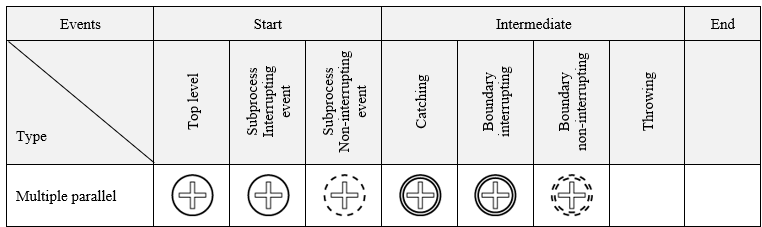
Table 13. Multiple parallel
Multiple parallel events contain more than one event definition and they are catching their corresponding trigger types. In the case of the Start events, their effect is to start a Process/Subprocess instance, while in the case of the Intermediate boundary events, their exit is via the exception flows or, for non-interrupting events, also via the normal flows.
Starting Catching
Multiple parallel Start event instantiates the Process/Subprocess instance according to the event definitions of the single events listed therein. In order to create a Process/Subprocess instance, all events marked on the list must occur.
Catching multiple Start events are handled in an analogous way for the top-level Process and the Event- driven Subprocess. In the latter case, there can be two variants of Start events, i.e. an interrupting variant, which causes the execution of the Process instance containing the Subprocess to be interrupted*,* and a non-interrupting variant, which allows it to continue.
Intermediate catching
Multiple Intermediate events occurring within the normal flow structure, upon receiving the token, listen for the matching throwing events according to the event definition list specified for them*.* Once all events in the list have occurred, the token is forwarded by the appropriate outgoing event flows.
Modelling events in BPMN 2 processes
Introduction of an extensive event model in the BPMN 2 process model allows for the design and implementation of semantically rich process specifications meeting the business process requirements. The event-based process architecture not only facilitates communication within the community of their potential users (business people), but also meets the requirements of real-life use cases.
The use of event modeling capabilities in executable workflow graphs is discussed in detail in this section. We present a number of useful process design patterns that will allow you to better understand the potential of the design and implementation features of the available modeling notation.
Each of the examples is presented on two interdependent levels, i.e. at the level of the analytical model developed in the workflow process design tool and as a process execution history graph. In some cases we present different variants of the implementation of the specified process model.
The colour codes used for interpretation of activity states visible in the process execution history graph are shown in Figure 2. The legend is placed in the upper right corner of the screen and has been cut omitted due to the need to maintain the visibility of the presented screenshots.
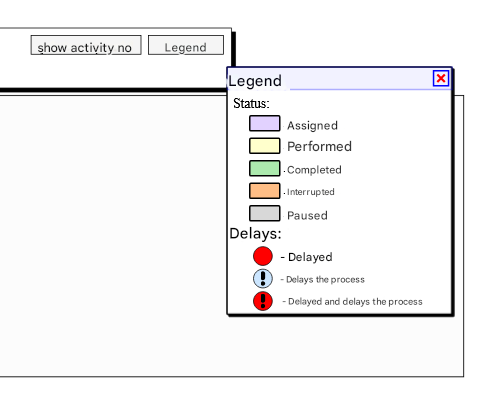
Figure 2. Legend of the execution states of process activities in the execution history graph
Example 1 – Event-driven Gateway
In the example we show the model of the Event-driven Gateway which is in fact a classic split XOR gate with the difference that its operation depends on events which are part of the gateway configuration. In our case we are dealing with two Condition events (Condition 1 and Condition 2) and a time constraint represented by the Timer. All events used in this gateway must belong to the category Intermediate Catching.
The process model is presented in Figure 3 and the execution history graphs of process instances are presented in Figure 4 and Figure 5.
The process model (Figure 3) corresponds to the situation in which after receiving the token, the gateway passes the tokens to all events defined in its configuration, and these in turn wait for their condition to be met (a logical value or the elapsed time for the Timer).
After the occurrence of any of the described events, the appropriate process path will be selected and the execution of the remaining conditions will be interrupted. This can be seen in the process execution history graphs corresponding to the individual variants of their execution.
In the first variant of the process execution, the event Condition1 was executed and the remaining events were interrupted (Figure 4). In the second variant, none of the conditions were met and after an appropriate time period, the Timer passed the token on to activity D and both events (Condition1 and 2) were Interrupted.
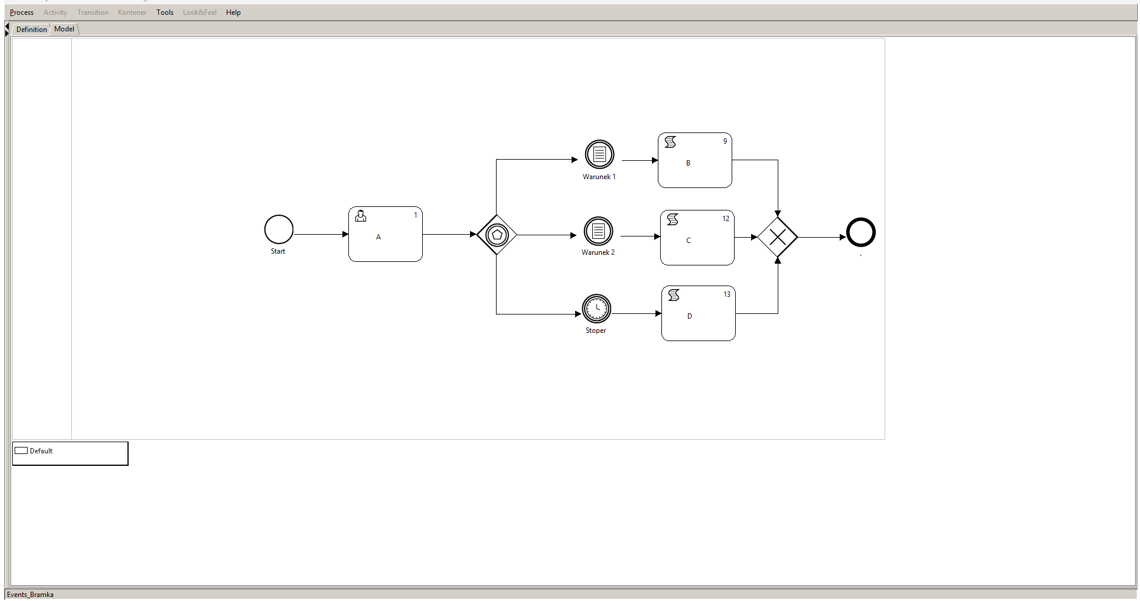 Figure 3. Definition of the Event-driven Gateway
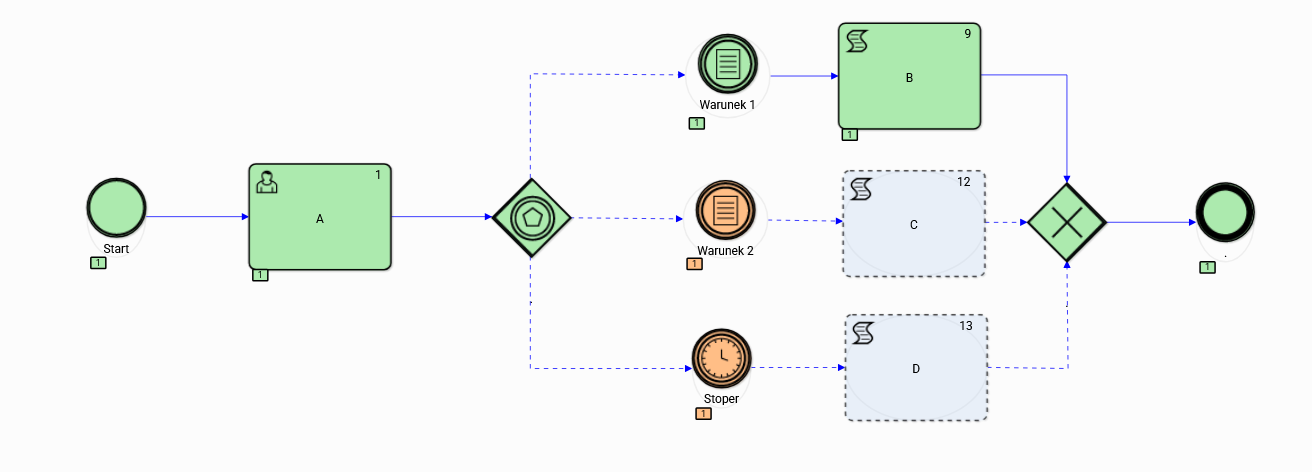
Figure 4. Execution history graph of the Event-driven Gateway variant 1
Event-driven gateways can be placed anywhere in the process/subprocess graph, including directly after the Start event. In the case where the events are Receive activities, we can model the communication flow between different work processes defined on different software platforms as well.
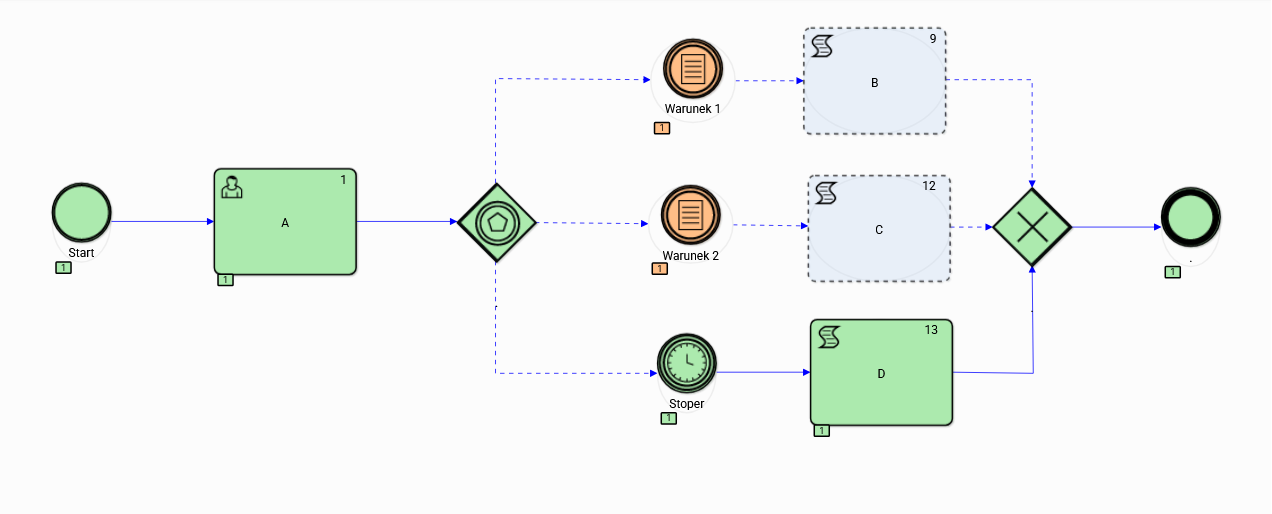
Figure 5. Execution history graph of the Event-driven Gateway variant 2
Example 2 Compensation
Compensation of intermediate process results is a typical activity necessary for proper handling of exceptional situations, which for various reasons may occur during the course of the procedure supported by the workflow process instance. Handling of such situations must be taken into account at the model level by introducing appropriate types of activities into the process graph*.*
The docuRob®WorkFlow system provides appropriate event types and activities that allow for the modeling of idempotent processes, i.e. processes that operate in accordance with the requirement that the intermediately obtained results of activities performed within the process (e.g. booking airline tickets) can be reversed in the case of an exceptional situation.
In our example, we present one of many possible patterns for handling compensation of task results executed within a process instance. We present different configurations of two interacting business processes, one of which is the higher-level process and the other is the called subprocess. Models of the interacting processes are shown in Figure 6 and Figure 7.
The model of collaborating processes predicts the correct completion of processes within the expected path and the selection of one of two different compensation requirements occurring in the subprocess comprising User tasks C and D.
The history of the execution of three variants 1, 2 or 3, which are presented respectively by the pairs Figure 8 and Figure 9, Figure 10 and Figure 11, Figure 12 and Figure 13. Both variants provide for automatic compensation (Script) of the effects of the execution of User tasks.
The first pair of execution history graphs shows the expected paths of both process instances without the need to refer to the Compensation activities*.*
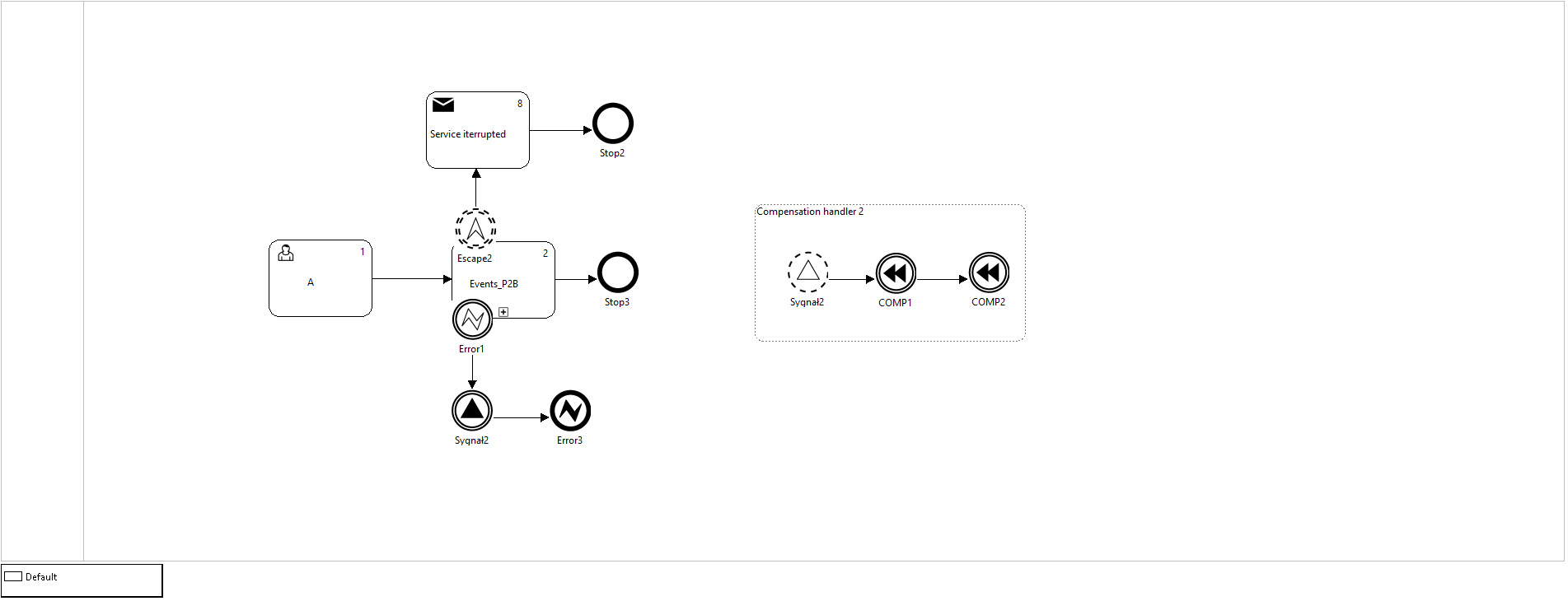
Figure 6. Higher level process definition
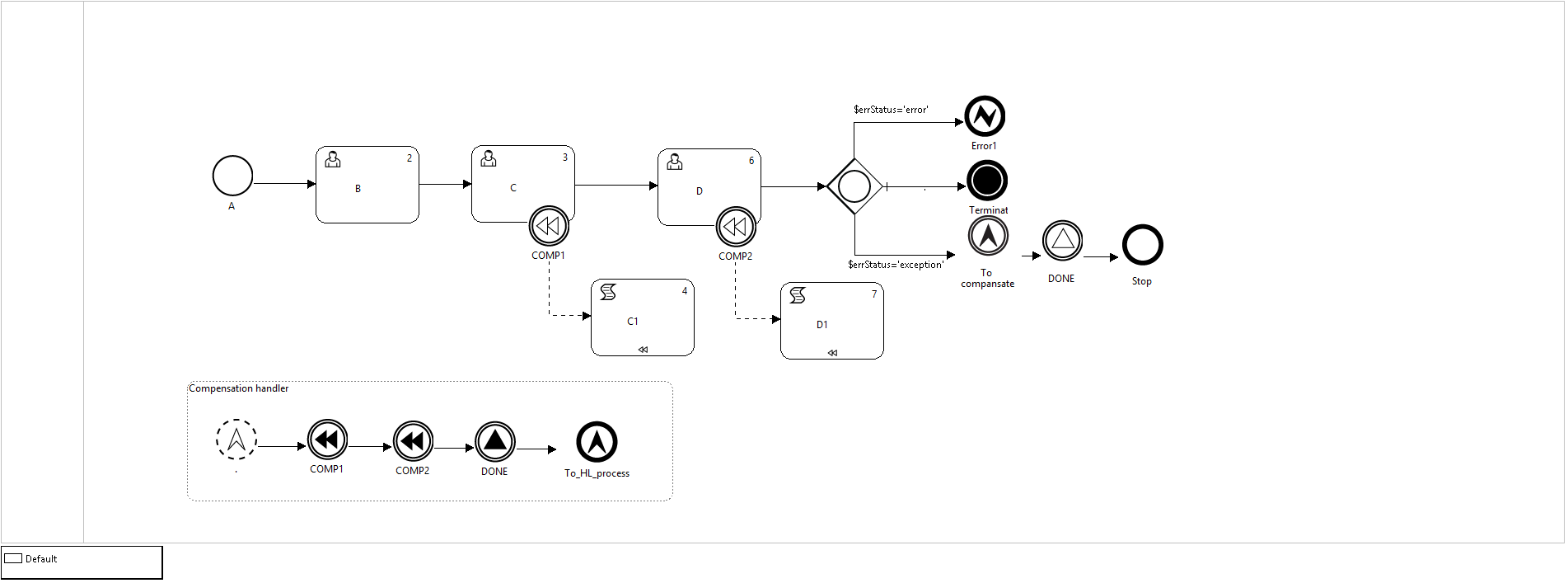
Figure 7. Definition of the sub-process comprising compensated tasks
In the second case (Figure 10 and Figure 11), the exception handling consists in qualifying the result of task D as an error and returning to the parent process with the End event Error caught in the parent process by the Error boundary event with the matching parameters. The Interrupting boundary event Error stops the execution of the compound activity number 2 (subprocess). The token is passed on the exception flow pass to the Intermediate throwing event Signal whose target event is the non- interrupting Start event of the Event- driven subprocess “Handling compensation”. Two intermediate events throwing Compensation are executed, triggering the compensation activities in the subprocess. The token is passed on the normal flow to the End Error event.
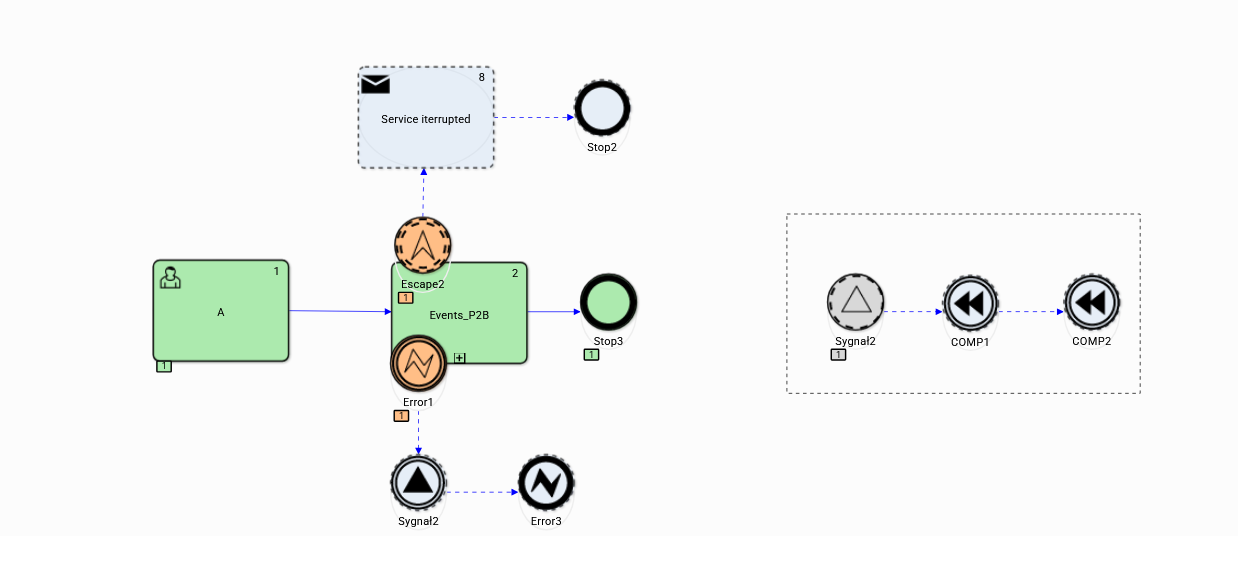
Figure 8. The expected top-level process path (variant 1)
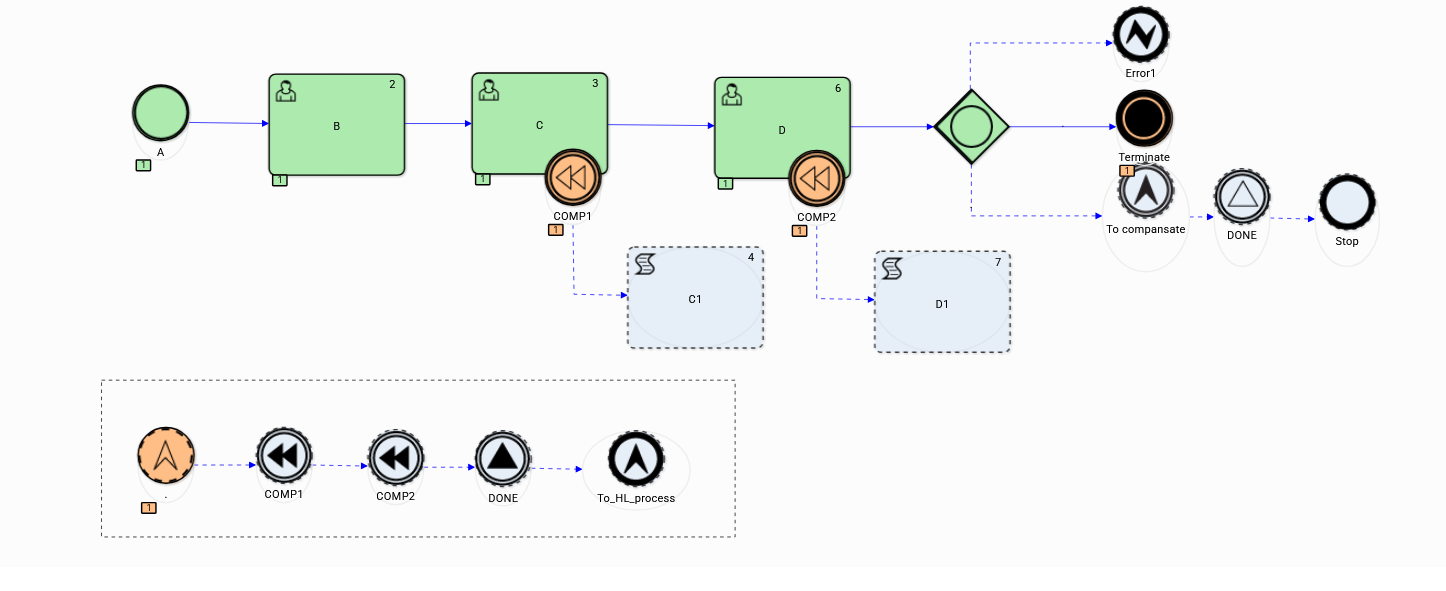
Figure 9. The expected subprocess path (variant 1)
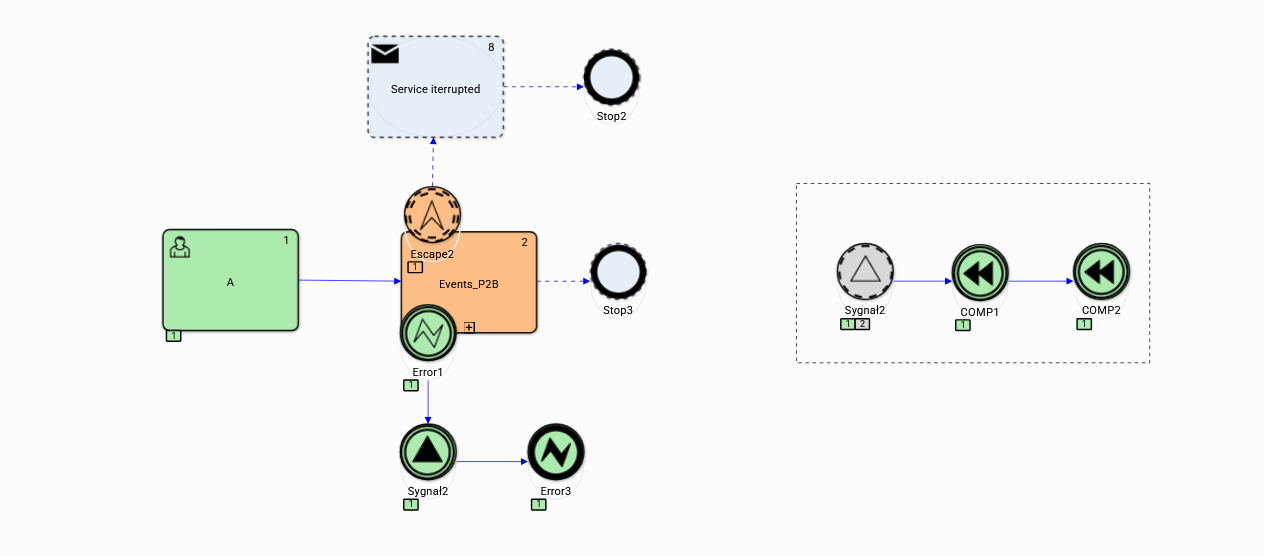
Figure 10. Higher level process execution history (variant 2)
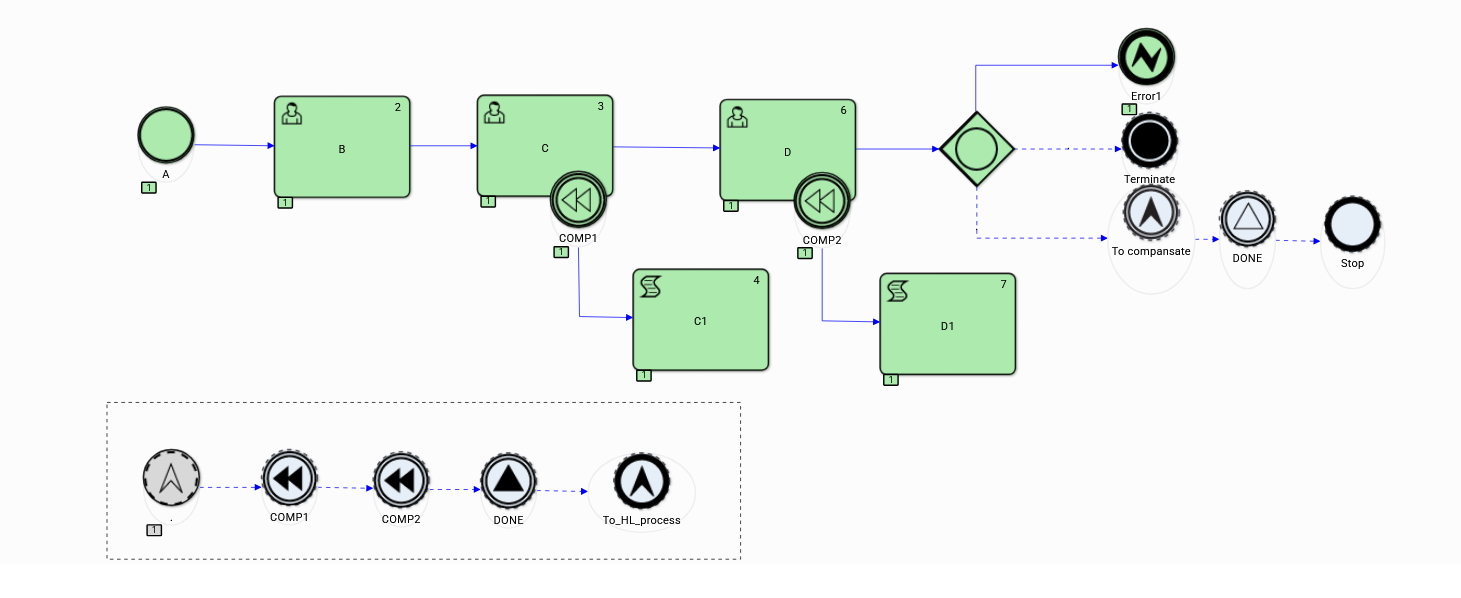
Figure 11. Execution history of the subprocess covering compensated tasks (variant 2)
In the third case supporting the idempotent behaviour of the subprocess (Figure 13) the compensation of tasks C and D is started by Intermediate throwing Escalation event causing instantiation the Event- driven subprocess. In this variant, the execution of the higher-level process ends normally and the boundary event Error is interrupted.
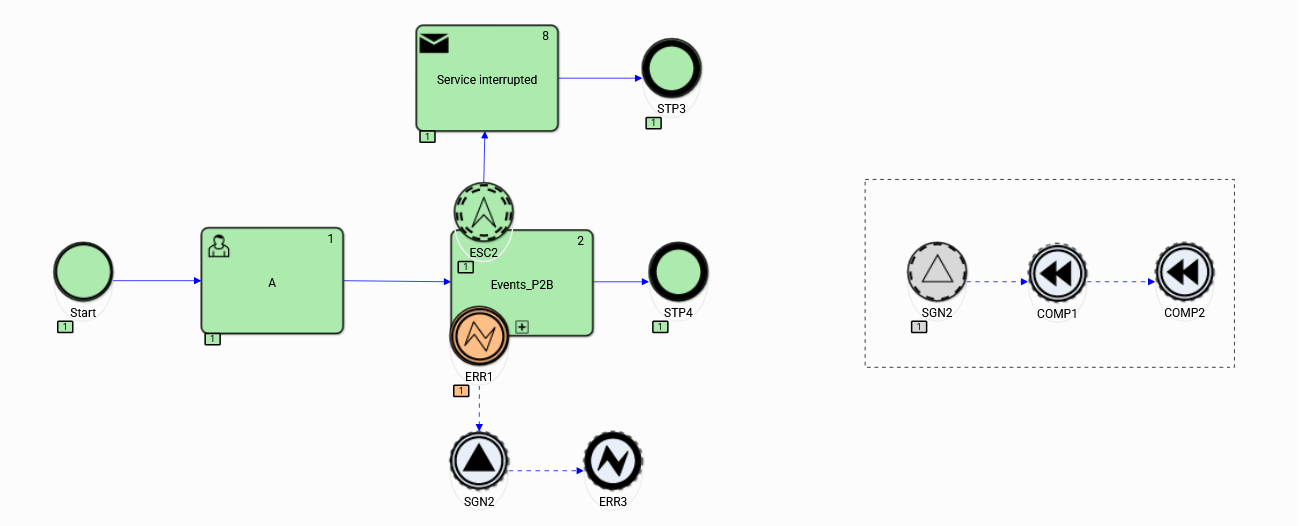
Figure 12. Higher level process execution history (variant 3)
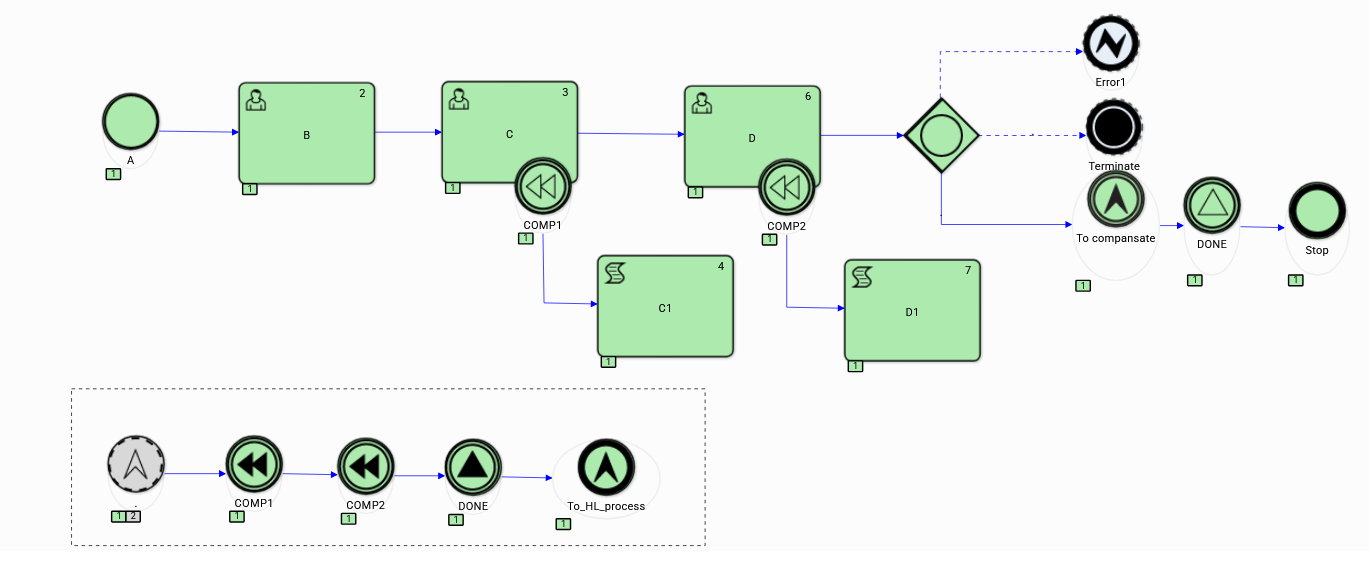
Figure 13. Sub-process execution history (variant 3)
Example 3 Boundary Events
Task execution time management allows both for detection of the occurring delays in the task execution and the opportunity of reacting in advance to the threat of a delay. The latter case, which occurs many times where execution time is critical, is a preferable solution.
Figure 14 is an example of a model in which we design the User task with critical execution time. Exceeding this time is equivalent to the failure of the task instance execution leading to its immediate termination with the End Error event*.*
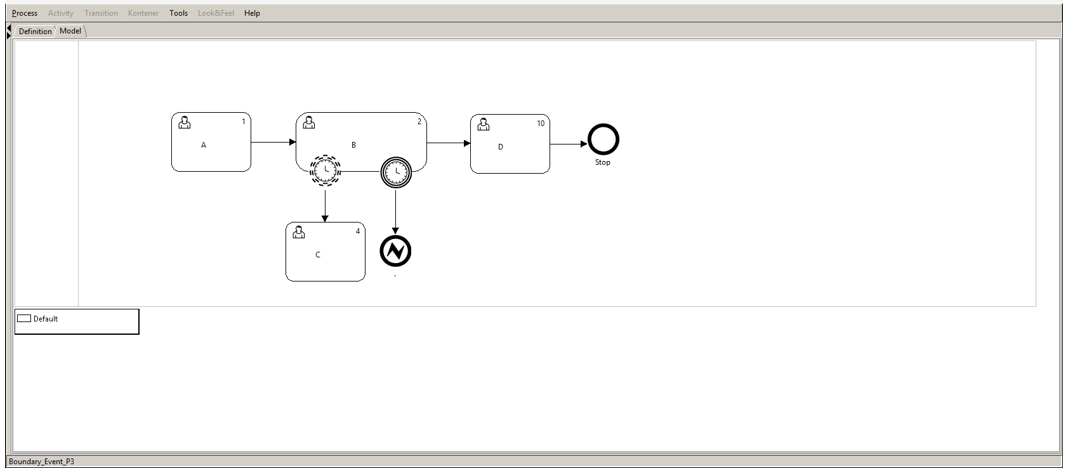
Figure 14. P3-Boundary event " Timer "
We can consider several probable variants of the execution of this process, which are shown Figure 15 to Figure 17. In the first variant of the execution, a situation occurred in which, despite the intervention undertaken (Task C), the supervised task was not started. This happened despite the warning transmitted to task C by the non-interrupting boundary tasks Timer.
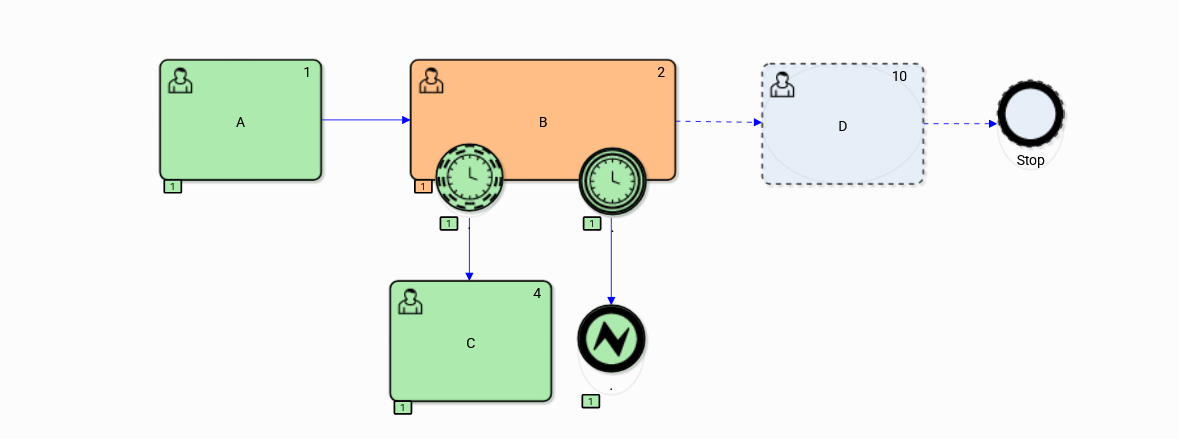
Figure 15. History of boundary event execution Timer variant 1
The passage of time caused task B to exceed the critical time limit, which resulted in the token being passed through the exception flow to the End Error event terminating the process.
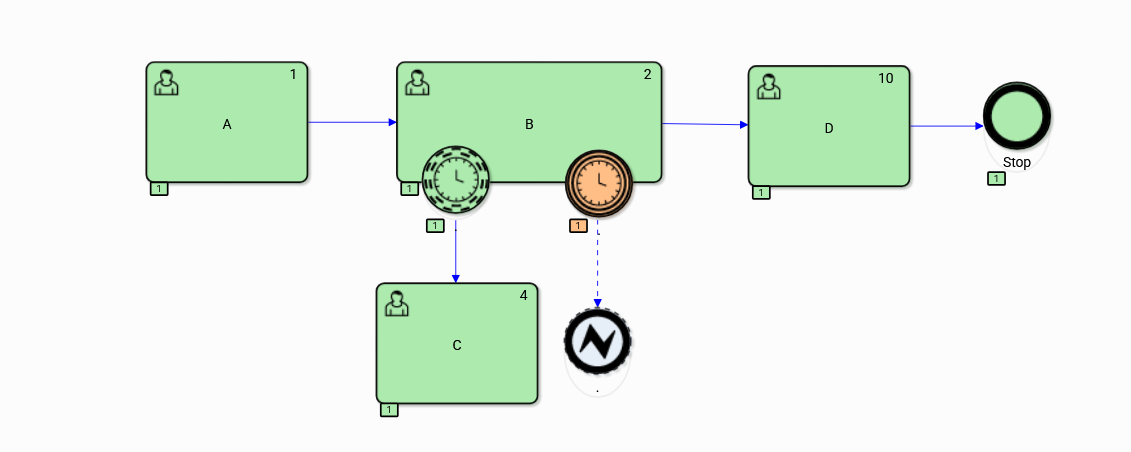
Figure 16. History of boundary event execution Timer variant 2
The second variant of the process execution (Figure 16) was supposed to pass a warning about a potential violation of time constraints by the Non-interrupting boundary event Timer to task C, where successful preventive action has been taken. As a result, task B continued and avoided a critical delay, and the process ended normally.
Also in the third execution variant (Figure 17) the process finished normally following the expected path because none of the “ Timer ” boundary events supervising the execution of task B were timed out.
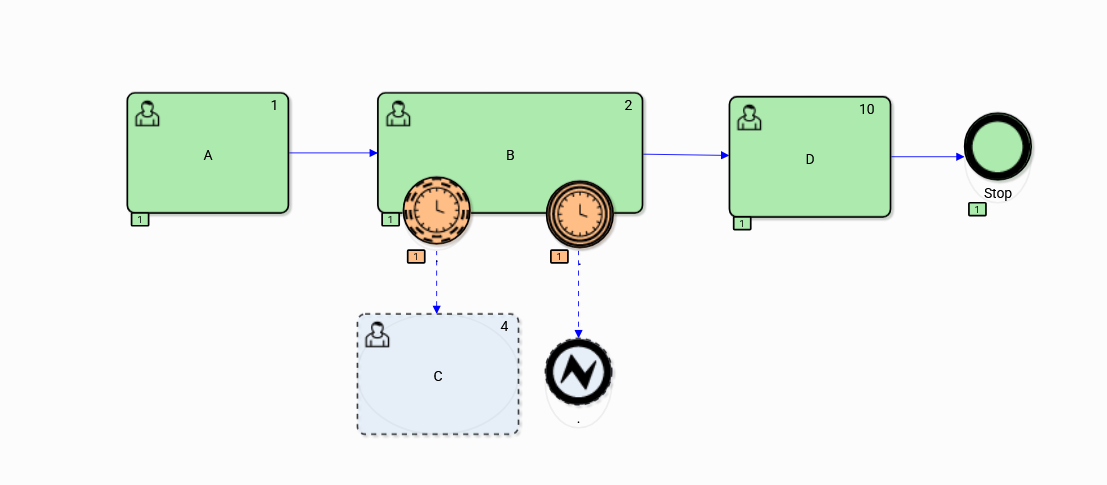
Figure 17. History of boundary event execution Timer variant 3
Example 4 - Iterations
The case of iterative control of the process path execution refers to the Event-driven Gateway, presenting the features of iterative use of such an element of the process model. In defining the gateway, all types of intermediate throwing events and their corresponding intermediate catching events can be used*.* Figure 18 presents the process model containing an Event-driven gateway executed iteratively (in this case there are two iterations) and Figure 19 illustrates the execution history of the process.
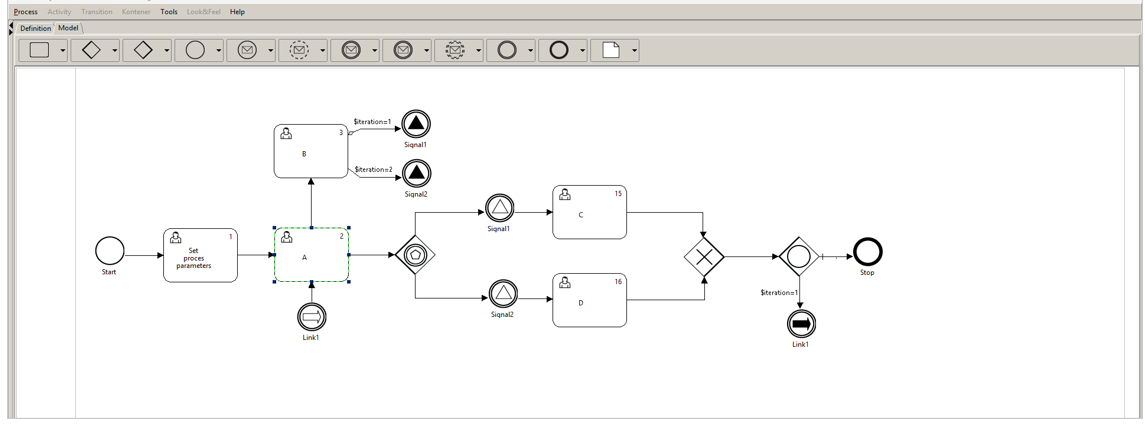
Figure 18. The process model of iterative path control of the process graph
Two alternative executions of a fragment of the process graph are modeled within the iterations, comprising tasks C and D, triggered by pairs of Signal events respectively*.* The path of the iteration depends on the successively triggered throwing events, and the selection of the event depends on the setting of the value of the global process variable $iteration. It is easy to see that the model is divided into two subgraphs, one constituting the expected process path including tasks <Set_process_parameters, A, C|D> and the other controlling executions of the iteration by the selective use of event dependencies.
Such a design pattern, coupled with the use of the BPQL process execution rules interpreting the process semantic model available within the process ontology ( Topic Maps), may be used to control the execution of a project plan by appropriate mapping its schedule (Gantt chart) onto the dynamic process graph.
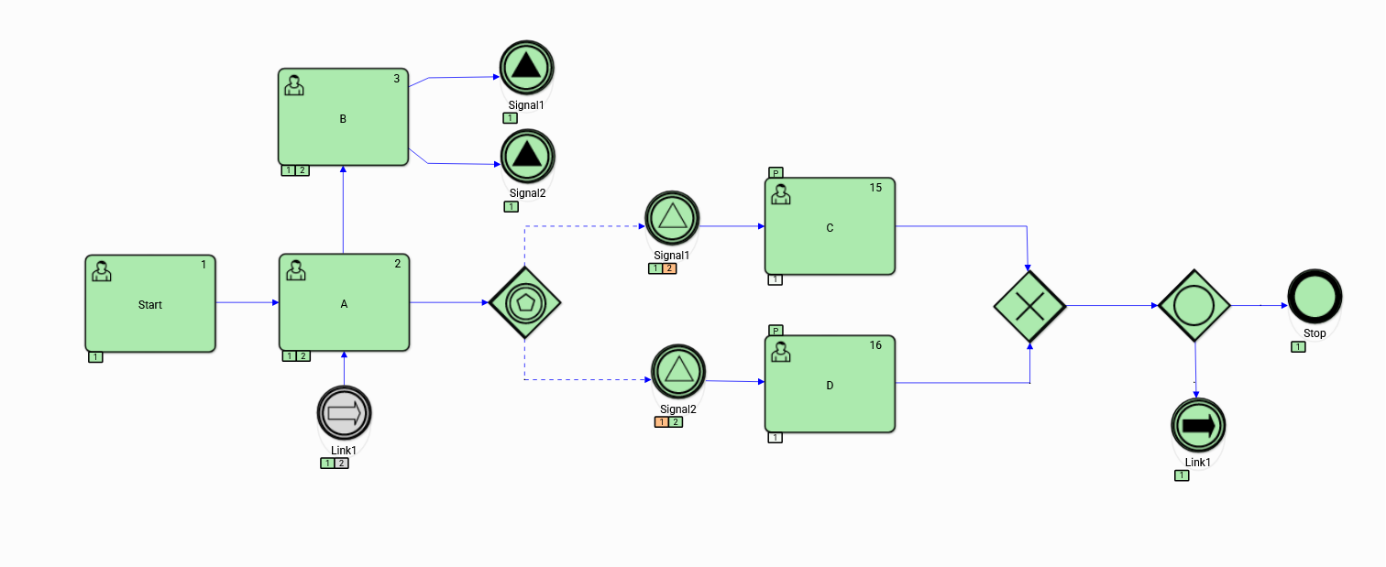
Figure 19. Execution history of the iterative path selection process