
General rules
Events metadata menu includes the following tabs:
- General information
- Flow
- Parameters
The metadata fields appearing in the General Information tab expansion include the following:
- Name – text describing the event, which can optionally be presented in the process graph
- Number – the symbol number within the process graph. The number is not presented on the graph, but is available within the Definition of the process
- Description - Can only contain descriptive text that appears as designer documentation. The description that appears in a throwing event should not generally be duplicated in its associated catching event. In this case, this field only appears in catching events that do not have associated throwing events.
Flow tab metadata defines the semantics of the event's input and output flows.
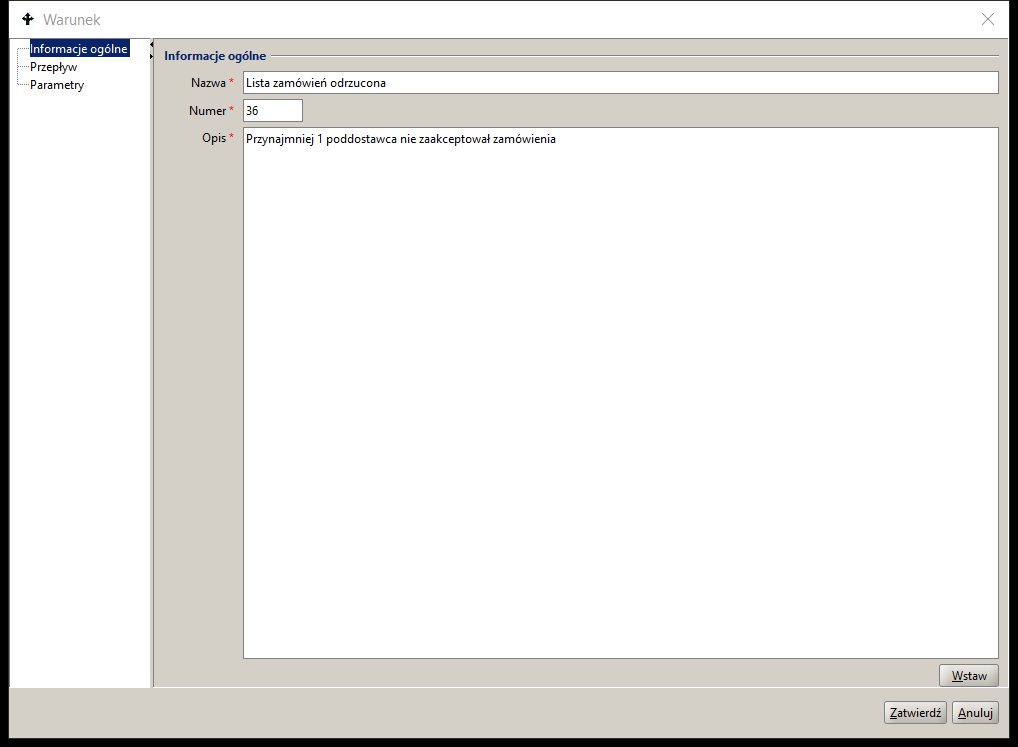
Figure 1. Event metadata
Parameters tab metadata contains the following elements:
- Type identifier (event Kind) for throwing and catching events. The value is assigned automatically based on the selected event graphic symbol.
- Instance ID (eventId) throwing event and catching event. The parameter value allows to identify pairs of events in the process model structure.
- Content (eventContent) – the parameter appears in events such as Message, Escalation and Signal. The field is used to pass content. It can be the value of the specified global process variable of the String type or directly written content.
- Process Instance ID (toProcessInstId) available as value a global variable of type String or a BPQL expression that was evaluated by the system when the process/subprocess instance was Startized.
- Process Identifier (toProcessId) value chosen as a unique identifier of the object maintained within the process/subprocesses structure. The value is passed as an input parameter (in) to the top-level process and is available throughout the process/subprocess hierarchy structure as the value of the global variable $name.
- Activity Id (toActivityId) value of type String is generated as the activity number during process model creation.
- Activity Instance Id (toActivityInstId) available as value a global variable of type String or a BPQL expression that was evaluated by the system when the activity instance was initiated.
The event parameter configuration is created during process modeling and all parameters except the type identifier, event instance identifier and process identifier are optional.
In case of autonomous events (i.e. without throwing events) the Condition and Timer parameters convey semantic information, such as for example for the Timer event the definition of the time parameters and for the Condition event the BPQL conditional expression.
The event parameters are implemented by the BPMN 2.02 event definition expression. For multiple events, an expression is defined for each selected event type.
An event definition based on a BPQL expression allows for the evaluation of conditions spanning different data sources;
- Global variables stored as container elements
- Local variables defined within the BPQL statement block defining the event semantics
- The values of the fields of the electronic form representing the main process object are selected directly or from the respective XML file using XPath queries.
- Topic Maps ontology attribute values available directly or via TMSL queries
- Values of relational data structure elements materialized through SQL queries
Table 1 provides a summary of all event types available in the docuRob® Workflow platform. The event groups are presented in the order of the main menu of the process design tool.
| Type | Start Top level | Start Subprocess Interrupt event | Start Subprocess Non-interrupting Event | Intermediate Catching | Boundary interrupting | Boundary non-interrupting | Intermediate Throwing | End | |
| No type |  |  |  | ||||||
| Announcement |  | |  |  | |  |  |  | |
| Timer |  | |  |  | |  | |||
| Error |  |  |  | ||||||
| Escalation |  |  |  |  |  |  | |||
| Compensation |  |  |  |  | |||||
| Condition |  | |  |  | |  | |||
| Link |  |  | |||||||
| Signal |  | |  |  | |  |  |  | |
| Break |  | ||||||||
| Multiple |  | |  |  | |  |  |  | |
| Multiple parallel |  | |  |  | |  |
Table 1. Summary table of event types
Start events
Start events cause the creation of a top-level process instance and the event-driven subprocesses defined within its scope. They are the starting point for the flows that occur in the process. The start event can have no incoming flows and it is the source of only one outgoing flow.
In the case of complex activities (marked with the symbol +), the start event of the Subprocess is an event without type. The definition of the start event is mandatory if an end event has been defined within the process.
The creation of a process instance can also be caused by the definition of an activity that has no incoming flows and is only a source of outgoing flows.
Top-Level Process Activation Rules
- A single start event creates an instance of the process each time it occurs.
- An exception to the above rule is the Receive Message task.
- For Multiple Start Events the following scenarios apply:
- Multiple instantiates exactly one instance of the process based on the event currently occurring. It does not wait for other events.
- Parallel Multiple can activate a process after the first event occurs. A process instance can be terminated after receiving and processing all the remaining defined events, which can arrive at any time during the execution of the process instance.
- A process instance can be terminated when the end element, that is, a task or a end event, has received all the tokens produced within that process instance.
Event-Driven Subprocess Activation Rules
- An event-driven subprocess is always activated when the start event of its enclosing process occurs and it waits to receive its start event trigger.
- A subprocess can only be activated when the enclosing Process/Subprocess is active. It is possible to activate multiple instances of non-interrupting event-driven subprocesses while the enclosing process is executing. In the case of interrupting subprocesses, execution can only occur once.
- If an Event Driven Subprocess starts on an Error event, the enclosing Process/Subprocess completes the emergency interrupt after the event handler completes.
- If an Event-Driven Subprocess starts for an interrupting event other than an Error (e.g. Escalation ), the enclosing Process/Subprocess enters the Terminating state and waits for the event handler to complete.
- Event-driven processes/subprocesses cannot have boundary events.
- A Subprocess either interrupts or does not interrupt the enclosing Process/Subprocess instance but always executes in its context. This also implies full access to the values of the global variables.
- An event-driven subprocess can re-trigger the event that caused its initiation by repeating it as a terminal event to enable further processing based on the boundary event of the encompassing Process/Subprocess.
Intermediate events
Intermediate events are placed anywhere in the process flow structure except at its beginnings and ends. They can also concern events associated with process activities, both elementary and complex, defined in the model as intermediate boundary events.
Intermediate catching events are used within the normal flow structure. After receiving a token, the catching event is activated and it subsequently waits to be triggered by the corresponding throwing event. After the event handler is executed, the token is moved according to the flow to the next activity.
Throwing events that target an Event Sub-process pass the token along on all outgoing flows.
Intermediate boundary events are activated when a token is received by the elementary or complex activity on whose boundary they are placed. The trigger that starts a boundary event is thrown by its corresponding throwing event or, as in the case of the Timer and Condition events, it is executed when the corresponding time or logical condition is met.
The trigger is propagated from the throwing event to the appropriate boundary event attached to the nearest activity that contains the throwing event (e.g., a process or subprocess). If no corresponding catching event is found the throwing event is left unhandled. Events placed on the boundary of an activity can be interrupting or non-interrupting.
Rules for the execution of intermediate events
- An intermediate throwing event, upon receiving an activating token, creates and sends a trigger according to the event description contained in its definition. Immediately after the above operation is performed, the token is passed on to the next activity.
- The catching event receives an activating token and waits to receive a trigger from the associated throwing event. After receiving the trigger the catching event passes the token to the next activity indicated by its outgoing flow.
Intermediate Boundary Event Execution Rules
- Interrupting boundary events cause the cloned token pass thru the exception flow, or flows. Execution of the associated activity is terminated and its token is consumed.
- Non-interrupting boundary events receive a cloned token and at the same time the execution of the associated activity continues. After each of these elements has completed their execution, the tokens are sent over the appropriate outgoing flows.
End events
End events close the process flow and cannot have any outgoing flows. If the end event occurs in a Process/Subprocess, then at least one Start event must occur at the same level. With the exception of the Terminate event, other end events can only be executed when there are no more active activities in the Process/Subprocess, i.e. there are no more tokens in its structure. The end event consumes subsequent tokens arriving at it until the flow of all tokens generated within this level is completed. The exceptions are tokens that are consumed within activities interrupted by intermediate boundary events. This also applies to Start interrupting events in event-driven subprocesses.
Process/Subprocess Termination Rules
- In case of the Termination end event, the instance of the Process/Subprocess that includes it is terminated. Other instances of this process are not terminated. All activities occurring in this process instance are terminated, including Compensation and Event-Driven Subprocess.
- For all other end events, the activity is determined by the trigger type, and the process instance is terminated only when the following two conditions are true:
- All events that were part of the Start Multiple Parallel Event were fired.
- There is no token in this process instance.
Event Driven Subprocess Termination Rules
In case of the Terminate event its subprocess instance is terminated. Other instances of this subprocess as well as instances of subprocesses at a higher level in the hierarchy and the top-level process instance are also terminated.
For all other end events, the activity specified by the trigger type occurs, while the subprocess instance is terminated only when the following two conditions are true:
- All subprocess start events were fired ( Multiple Parallel Event ).
- There is no token in this subprocess instance.
Types of events
Event without trigger type
| Type | Start Top level | Start Subprocess Interrupting event | Start Subprocess Non-interrupting event | Intermediate Catching | Boundary interrupting | Boundary non-interrupting | Intermediate Throwing | End |
|---|---|---|---|---|---|---|---|---|
| No type | | | |
Table 2. Event without trigger type
Starting Top Level
The event is initiated by the createProcessInstance service available in the docuRob® WorkFlow platform API. The result is the creation of a new top-level process instance based on the specified Process/Subprocess definition, for the specified User, taking into account the input parameters and an optional reference to an external data container
An Event is optional at the top-level Process or Sub-Process level defined within the flow structure of an enclosing Process. The Start event and its corresponding End event are independent of other levels of the process hierarchy.
All Flow Objects that do not have incoming flows are activated within the instantiation of the encompassing process.
The event is used to instantiate subprocesses receiving a token within the defined flow structure of the encompassing Process/Subprocess. A subprocess is an element of a hierarchy of subprocesses defined within the top-level process and it is started within a compound activity that is distinguished by the + marker.
Intermediate throwing
An untyped throwing event can only occur within the normal Process/Subprocess flow structure. The event does not fire any trigger and can be used (e.g. in a log) to signal the current state of the process.
End throwing
The termination event interrupts the execution of the process instance path according to the adopted Process/Subprocess termination algorithm and does not throw any trigger.
Message
| Type | Start Top level | Start Subprocess Interrupting event | Start Subprocess Non-interrupting event | Intermediate Catching | Boundary interrupting | Boundary non-interrupting | Intermediate Throwing | End |
|---|---|---|---|---|---|---|---|---|
| Announcement | | | | | | | | |
Table 3. Message
A message may be sent by another, external Process/Subprocess that is not hierarchically related to the same top-level Process, i.e. the related throwing event may be placed within the flow structure of another top-level Process, and/or its hierarchically related Sub-Processes.
Startup – the highest level process
Upon receiving the message, the docuRob®WorkFlow platform starts a new instance of a Process containing the Start task of type Message.
Start interrupting - event driven subprocess
Upon receipt of the expected Message, the Start event causes the execution of the Event-Driven Subprocess to begin*,* while simultaneously initiating the termination of the Process/Subprocess within which the given subprocess is defined. The environment of the encompassing Process/Subprocess is available until the initiated Event-Driven Subprocess is terminated*.*
Starting non-interrupting – event driven subprocess
Upon receiving the expected Message, the Start event causes the execution of the Event-Driven Subprocess to begin*.* At the same time, the Subprocess containing the throwing event continues execution.
Intermediate catching
After receiving the Message the process continues. In case of an interrupting boundary event the token is passed on via the exception flow and, in case of a non-interrupting event, also via the normal flow, after the associated activity has completed.
Intermediate throwing
Sending a Message to another Process/Subprocess that is not related within the hierarchy of the current (sending) Process/Subprocess. After sending the Message, the process flow continues according to the definition of normal flows.
End Throwing
Sending a Message to an external catching process, subprocess or information system that initiated the process being terminated. None of the above elements can belong to the same top-level Process hierarchy.
Timer
| Type | Start Top level | Start Subprocess Interrupting event | Start Subprocess Non-interrupting event | Intermediate Catching | Boundary interrupting | Boundary non-interrupting | Intermediate Throwing | End |
|---|---|---|---|---|---|---|---|---|
| Timer | | | | | | |
Table 4. Timer
After receiving a token as part of the execution of the Process/Subprocess instance that includes it, the Timer Catching event waits for a defined time condition to be met*.*
The event waits for a specified period of time to elapse. It can be defined in three ways:
- absolute: a specific number of days, hours, minutes and seconds
- or: a specific date and/or time that must pass (e.g. Friday 15:50:59 or 25th of the month 07:59:59)
- dynamically: using a BPQL expression. The expression must return the wait time in milliseconds. It is evaluated anew each time the Timer event is fired (e.g. in loops).
Start – the highest level process
Once the time condition specified in the event definition is met, the docuRob®WorkFlow platform starts a new instance of type Process with a Start event of type " Timer ".
Start interrupting - event driven subprocess
After the time condition specified in its definition is met, the Start event starts the execution of the Event-Driven Subprocess and simultaneously initiates the completion of the execution of the Process/Subprocess within which the given subprocess is defined.
Starting non-interrupting – event driven subprocess
After the time condition specified in its definition Z is met, the start event causes the execution of the Event-driven Subprocess to begin. At the same time, the Process/Subprocess continues its execution.
Intermediate
The Timer catching event is initiated upon receiving a token within the normal flows or in the case of an boundary event together with its associated activity. After meeting the time condition specified in its definition, the intermediate event passes the token through a normal flow. In the case of an interrupting boundary event, the associated activity is terminated and the token is passed through an exception flow. A non-interrupting boundary event allows the associated activity to continue and the tokens will be passed on through the normal activity flows and the exception flows of the boundary event, respectively.
Error
| Type | Start Top level | Start Subprocess Interrupting event | Start Subprocess Non-interrupting event | Intermediate Catching | Boundary interrupting | Boundary non-interrupting | Intermediate Throwing | End |
|---|---|---|---|---|---|---|---|---|
| Error | | | |
Table 5. Error
An event of type Error is always an interrupting event because it is initiated after an error occurs that causes execution to be interrupted. The token is passed by the exception flow.
Start interrupting - event driven subprocess
Starts an error handling Subprocess waiting for a trigger generated by the corresponding throwing event defined in the enclosing Process/Subprocess. Due to the nature of the error event, it always results in the interruption of the enclosing Process/Subprocess.
Intermediate boundary
The event receives a trigger related to a specific error type or, if none is specified, triggers related to errors of any type. The catching event occurs exclusively in the interrupting form. Upon receiving the trigger, the event interrupts the execution of the associated activity.
End Throwing
This type of end event generates a named error message that occurred in the Subprocess being closed*.* All currently executing paths of the subprocess are terminated.
Escalation
| Type | Start Top level | Start Subprocess Interrupting event | Start Subprocess Non-interrupting event | Intermediate Catching | Boundary interrupting | Boundary non-interrupting | Intermediate Throwing | End |
|---|---|---|---|---|---|---|---|---|
| Escalation | | | | | | |
Table 6. Escalation
Start interrupting - event driven subprocess
After receiving the token the Start event starts the execution of an Event-driven Subprocess while simultaneously initiating the completion of the execution of the Process/Subprocess within which the given Subprocess is defined.
Starting non-interrupting – event driven subprocess
After receiving the token the Start event causes the execution of the Event-Driven Subprocess to begin. At the same time, the Subprocess containing the throwing event continues to execute.
Intermediate boundary
The interrupting Escalation event interrupts the execution of the associated activity and the token is passed on according to the exception flow.
The non-interrupting Escalation event does not interrupt the execution of the associated activity, and an additional token is generated and passed on according to the exception flow.
Intermediate throwing
Occurs within the normal flow structure of a Process/Subprocess and fires a catching Escalation event upon receiving a token. The target event can be an interrupting or non-interrupting boundary event or a Start event of an Event-driven sub-process
End Throwing
The end Escalation throwing event terminates the instance of the containing Process/Subprocess and fires the associated catching event placed in the higher-level Process/Subprocess that calls the Subprocess.
Compensation
| Type | Start Top level | Start Subprocess Interrupting event | Start Subprocess Non-interrupting event | Intermediate Catching | Boundary interrupting | Boundary non-interrupting | Intermediate Throwing | End |
|---|---|---|---|---|---|---|---|---|
| Compensation | | | | |
Table 7. Compensation
The compensating activity is intended to reverse the effects of activities performed automatically or tasks performed by the User as well as Subprocesses associated with them via a catching event Compensation. The association between an activity and its compensating activity is defined by an association represented in the process graph as a dashed line. Compensation applies only to activities that have been performed and completed correctly. Compensation events associated with an activity that ended with an error or has not been executed are ignored. Catching Compensation events are modeled solely as interrupting events because the Activities associated with them must already be completed.
The Activity Compensation handler can be implemented as an automatic activity or a Subprocess not included the flow structure of the enclosing Process/Subprocess or as an Event-driven Subprocess started by the Start catching Compensation event.
In the first case, the Activity or Sub-process of the type Compensation are specified with a marker and linked to the compensated activity via a boundary catching interrupting event, to be triggered by the corresponding throwing event, either Intermediate or End. On the other hand, the Event-driven Subprocess is to be commenced by its Start event of the type Compensation.
Handling Compensation is done synchronously, which means that the throwing event waits for the triggered activity to finish Compensation. Waiting for completion pertains to all types of the compensating activities and subprocesses, including Event-driven subprocesses.
Intermediate boundary
The event is activated when the associated activity receives a token and waits until its completion for a trigger to be thrown by the respective throwing event. If the conditions for starting the compensation handler are met, the associated Compensation type activity will be launched*.*
For a Multiple activity, each of the concurrent instances is compensated by the dedicated instance of the Compensation activity. Calling the compensating Event-driven Subprocess involves simultaneous compensation of all instances of the Multiple Activity.
Subprocess interrupting Start event
An event is activated when the including Process/Subprocess starts and it waits for a trigger generated by an Intermediate or End throwing event. Activation of an event creates an instance of an Event-driven Subprocess of the type Compensation responsible for the reversal of the effects of activities performed within the encompassing Process/Subprocess.
Intermediate throwing
The throwing Compensation event that occurs in the normal flow of the process graph triggers compensation activities via any catching event Compensation unless a specific catching event of this type has been addressed. In both of the above cases compensation handlers will be performed for activities that meet the following conditions:
- The intermediate throwing event is contained in the normal flow of the same level of Process/Subprocess
- The intermediate throwing event is contained in a Subprocess driven by the Compensation event, which is contained in the same Process/Subprocess level.
End Throwing
Termination of a process instance by End throwing events of the type Compensation causes compensation activities to be triggered by any catching event unless a specific catching event has been addressed. In either case, compensation will be performed for activities that meet the following conditions:
- The end throwing event is contained in the normal flow of the same level of Process/Subprocess
- The end throwing event is contained in the Event-Driven Subprocess "Compensation", which is contained in the same Process/Subprocess level.
Condition
| Type | Start Top level | Start Subprocess Interrupting event | Start Subprocess Non-interrupting event | Intermediate Catching | Boundary interrupting | Boundary non-interrupting | Intermediate Throwing | End |
|---|---|---|---|---|---|---|---|---|
| Condition | | | | | | |
Table 8. Condition
After receiving a token the Condition event, occurring within the enclosing Process/Subprocess instance, waits for the defined logical condition to be met. A condition, the evaluation of which returns the logical value "true" or "false", is defined as a BPQL expression.
Start – the highest level process
Once the logical condition specified in the event definition is met, the docuRob® WorkFlow platform initiates a new instance of a Top-Level Process containing a Condition Start event. A BPQL expression can access data sources that exist outside the Top-Level Process being initiated, as well as static variables associated with its definition.
Start interrupting - event driven subprocess
If the logical condition is met the Start event of the type condition starts the execution of the Event- driven Subprocess and simultaneously initiates termination of the execution of the Process/Subprocess within which the given Subprocess is defined. In order to maintain the possibility of accessing the context of the encompassing the Process/Subprocess, the instance termination phase is synchronous with the invoked Event-driven Subprocess.
Starting non-interrupting – event driven subprocess
If the logical condition is met, the Start event starts the execution of the Event-driven Subprocess. At the same time, the enclosing Process/Subprocess continues execution.
Intermediate catching
After receiving the token, the Condition event waits for the logical condition given in its definition to be met. Once the condition is met, the event sends the token by the appropriate outgoing flow.
Intermediate
The condition event is initiated after receiving a token within the normal flow or, in the case of a boundary event, together with its associated activity. When the logical condition is met, the intermediate event passes the token through the normal flow. In the case of an interrupting boundary event, the associated activity is terminated and the token is passed through an exception flow. A non-interrupting boundary event allows the associated activity to continue and the tokens will be passed both through normal and exception flows.
Link
| Type | Start Top level | Start Subprocess Interrupting event | Start Subprocess Non-interrupting event | Intermediate Catching | Boundary interrupting | Boundary non-interrupting | Intermediate Throwing | End |
|---|---|---|---|---|---|---|---|---|
| Link | | |
Table 9. Link
Intermediate events Link can be used within the normal flow structure of the same Process/Subprocess to connect parts of the process graph. The event allows avoiding long flow lines that may run between activities located in distant sections of the graph. A typical use can be to define process cycles that include many different BPMN 2.02 notation elements.
Intermediate catching
Multiple different throwing events of type " Link " can point to one catching event Link.
Intermediate throwing
The same throwing Link event can point to one catching Link event.
Signal
| Type | Start Top level | Start Subprocess Interrupting event | Start Subprocess Non-interrupting event | Intermediate Catching | Boundary interrupting | Boundary non-interrupting | Intermediate Throwing | End |
|---|---|---|---|---|---|---|---|---|
| Signal | | | | | | | | |
Table 10. Signal
Catching
Top level process Start event Signal can initiate a Process instance if it receives a trigger generated by an instance of another process or an external information system. Such an external throwing event can address many different Start events of different processes. The Signal catching event can receive the message content generated by the associated throwing event.
An interrupting Signal start event initiates an instance of an Event-driven Subprocess and simultaneously interrupts the execution of an instance of the encompassing Process/Subprocess. A non-interrupting Signal Start event works similarly, but allows the encompassing Subprocess instance to continue.
Activated Intermediate Signal events are catching triggers generated by throwing events occurring both within their scope of visibility and those generated by external processes and/or independent IT systems. Upon receiving a trigger Catching events, except for interrupt-related or non-interrupt-related handling, pass the token through their outgoing exception flows.
Signal boundary events work analogously to the events initiating Event-driven Subprocesses, whereby they interrupt or not an instance of their parent activity. In the case of the interrupt option, the token is passed only on the exception flows coming from the event, whereas in the case of its continuation, the token is also passed on the normal flow.
Intermediate throwing
After receiving the token, intermediate throwing events of the type Signal generate an appropriate trigger, which can be received by any catching events of the same type that are in the active state, i.e. having received a token.
End throwing
The End throwing Signal events work analogously to the intermediate one and additionally terminate the Process/Subprocess instance in accordance with the adopted constraints of the processing closure operations.
End
| Type | Start Top level | Start Subprocess Interrupting event | Start Subprocess Non-interrupting event | Intermediate Catching | Boundary interrupting | Boundary non-interrupting | Intermediate Throwing | End |
|---|---|---|---|---|---|---|---|---|
| End | |
Table 11. Conclusion
The Termination event causes the process to be terminated immediately. This means that all activities, including all instances of Multiple Activities, will be unconditionally terminated. The process is terminated without performing any compensation or event handling.
Multiple
| Type | Start Top level | Start Subprocess Interrupting event | Start Subprocess Non-interrupting event | Intermediate Catching | Boundary interrupting | Boundary non-interrupting | Intermediate Throwing | End |
|---|---|---|---|---|---|---|---|---|
| Multiple | | | | | | | | |
Table 12. Multiple
Multiple events contain more than one event definition and throw or catch their corresponding trigger types accordingly. In the case of Start Events, their effect is to start a Process/Subprocess instance, while in the case of Intermediate Boundary Events, they exit using exception flows in the case of interrupting events or, for non-interrupting events, exception flows and normal flows.
Starting catching
Multiple Start events allow for the initiation of a Process/Subprocess instance according to the definitions of the individual events listed therein. The occurrence of just one of them is enough to create an instance of the Process/Subprocess.
Catching multiple Start events are handled in an analogous way for a Top-level Process and an Event- driven Subprocess. In the latter case, there can be two variants of Start events, i.e. an interrupting variant that causes the execution of the Process instance containing the Subprocess to be interrupted, and a non-interrupting variant that allows it to continue.
Intermediate catching
Multiple intermediate events occurring within the normal flow structure, upon receiving a token, listen for throwing events according to the event definition list defined for them*.* After at least one of such events occurs the token is forwarded via the appropriate outgoing flows.
Intermediate throwing
An intermediate multiple throwing event, upon receiving a token, generates Triggers for all event definitions specified in its list.
End Throwing
If a Process/Subprocess is terminated by a Multiple throwing event, then triggers are generated for all event definitions specified in its list.
Multiple parallel
| Type | Start Top level | Start Subprocess Interrupting event | Start Subprocess Non-interrupting event | Intermediate Catching | Boundary interrupting | Boundary non-interrupting | Intermediate Throwing | End |
|---|---|---|---|---|---|---|---|---|
| Multiple parallel | | | | | | |
Table 13. Multiple parallel
Multiple parallel events contain more than one event definition and they are catching their corresponding trigger types. In the case of Start events, their effect is to start a Process/Subprocess instance, while in the case of intermediate boundary events, their exit is via exception flows or, for non-interrupting events, also via normal flows.
Starting Catching
Multiple parallel start event allows to initiate Process/Subprocess instance according to the event definitions of the single events listed therein. In order to create a Process/Subprocess instance, all events marked on the list must occur.
Catching multiple Start events are handled in an analogous way for a top-level Process and an Event- driven Subprocess. In the latter case, there can be two variants of Start events, i.e. an interrupting variant, which causes the execution of the Process instance containing the Subprocess to be interrupted, and a non-interrupting variant, which allows it to continue.
Intermediate catching
Multiple intermediate events occurring within the normal flow structure, upon receiving a token, listen for throwing events according to the event definition list defined for them. Once all events in the list have occurred, the token is forwarded by the appropriate outgoing event flows.
Examples of events in process modeling
The introduction of an extensive event model in the BPMN2 graphical model allows for the creation of semantically rich process descriptions that not only facilitate communication with their potential users (business people) but also build executable representations of the realistic models of actual processes existing in the organization, taking into account cases of deviations from the expected course of the process ('lucky path') representing assorted life events.
The use of event modeling capabilities in executable workflow graphs is discussed in detail in this chapter. Below we present a number of useful design patterns that will allow you to better understand the potential of the design and implementation features of the available modeling notation.
Each of the examples is presented on two interdependent levels, i.e. at the level of the analytical model developed in the workflow process design tool and as a process execution graph. If it is worth showing, we present different variants of the implementation of the specified process model.
The colour codes used for interpretation of activity states visible in the process execution history graph are shown in Figure 2. The legend is placed in the upper right corner of the screen and has been cut off due to the need to maintain the visibility of the presented screenshots.
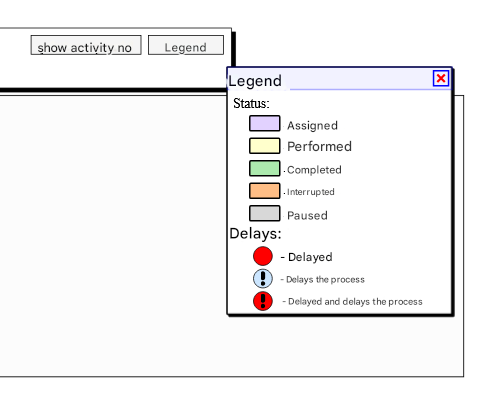
Figure 2. Legend of the execution states of process activities in the execution history graph
Example 1 – Event-driven Gateway
In the example we show the model of the Event-driven Gateway which is in fact a classic split XOR gate with the difference that its operation depends on events which are part of the gateway configuration. In our case we are dealing with two conditions events (Condition 1 and Condition 2) and a time constraint represented by the Timer. All events used in this gateway must belong to the category Intermediate Catching.
The process model is presented in Figure 3 and the execution history graphs of process instances are presented in Figure 4 and Figure 5, respectively .
The process model ( Figure 3 ) corresponds to the situation in which after receiving the token, the gateway passes the tokens to all events defined in its configuration, and these in turn wait for their condition to be met (a logical value or the elapsed time for the Timer).
After the occurrence of any of the described events, the appropriate process path will be selected and the execution of the remaining conditions will be interrupted. This can be seen in the graphs of the history of the process execution corresponding to the individual variants of their execution.
In the first variant of the process execution, the event Condition1 was executed and the remaining events were interrupted (Figure 4 ). In the second variant, none of the conditions were met and after an appropriate time period, the Timer passed the token on to activity D and both events ( Condition1 and 2) were Interrupted.
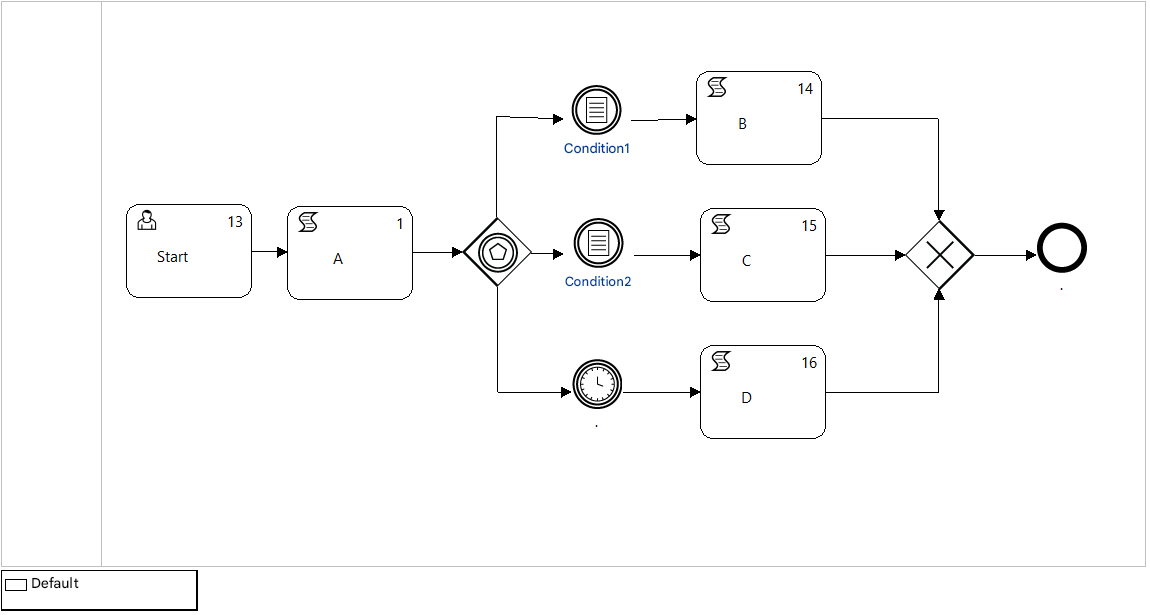
Figure 3. Definition of Event-Driven Gateway
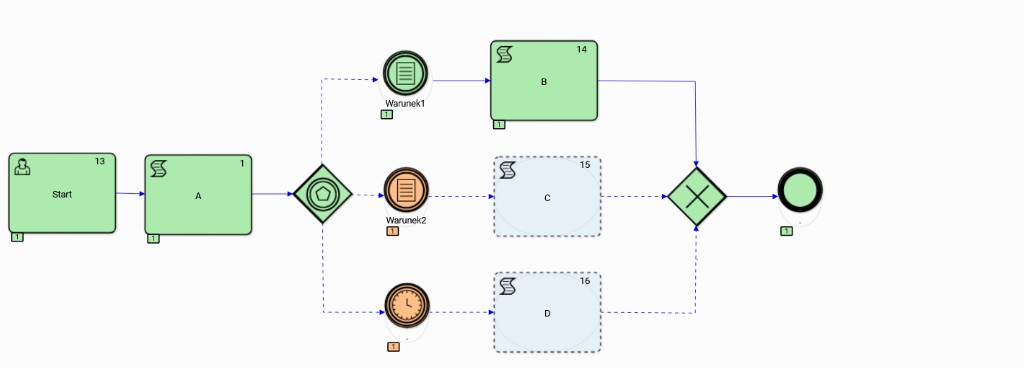
Figure 4. Execution history graph of the Event-Driven Gateway variant 1
Event-driven gateways can be placed anywhere in the process/subprocess graph, including directly after the Start event. In the case where the events are Receive activities, we can model the communication flow between different work processes defined on different software platforms as well.
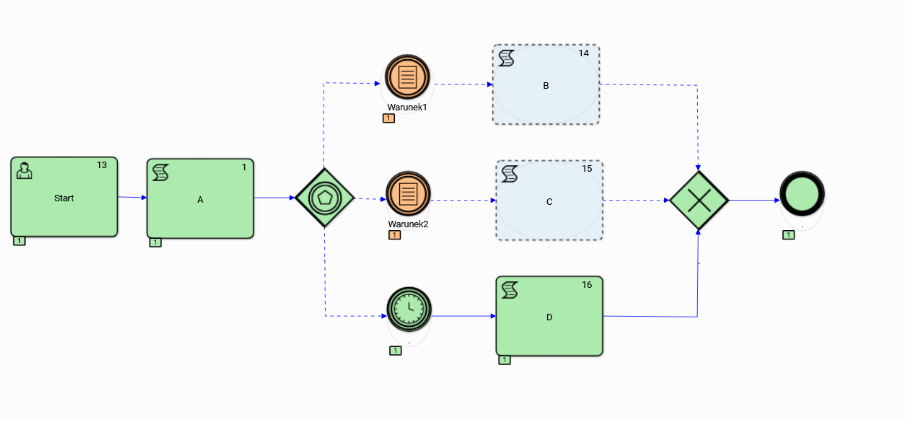
Figure 5. Execution history graph of the Event-Driven Gateway variant 2
Example 2 Compensation
Compensation of intermediate process results is a typical activity necessary for proper handling of exceptional situations, which for various reasons may occur during the course of the procedure supported by the work process instance. Handling of such situations must be taken into account at the model level by introducing appropriate types of activities into the process graph.
The docuRob®WorkFlow system provides appropriate event types and activities that allow for the modeling of idempotent processes, i.e. processes that operate in accordance with the requirement that the intermediately obtained results of activities performed within the process (e.g. booking airline tickets) can be reversed in the event of an exceptional situation.
In our example, we present one of many possible patterns for handling compensation of task results executed within a process instance for different configurations of two work process instances, one of which is a higher-level process and the other is a called subprocess. Models of such interacting processes are shown in Figure 6 and Figure 7, respectively .
The model of collaborating processes predicts the correct completion of processes within the expected path and the selection of one of two different compensation requirements occurring in the subprocess comprising User tasks C and D.
The history of the execution of three variants 1, 2 or 3, which are presented respectively by the pairs Figure 8 and Figure 9, Figure 10 and Figure 11 , Figure 12 and Figure 13 . Both variants provide for automatic compensation (Script) of the effects of the execution of User tasks.
The first pair of execution history graphs shows the expected paths of both process instances without the need to refer to the Compensation activities*.*
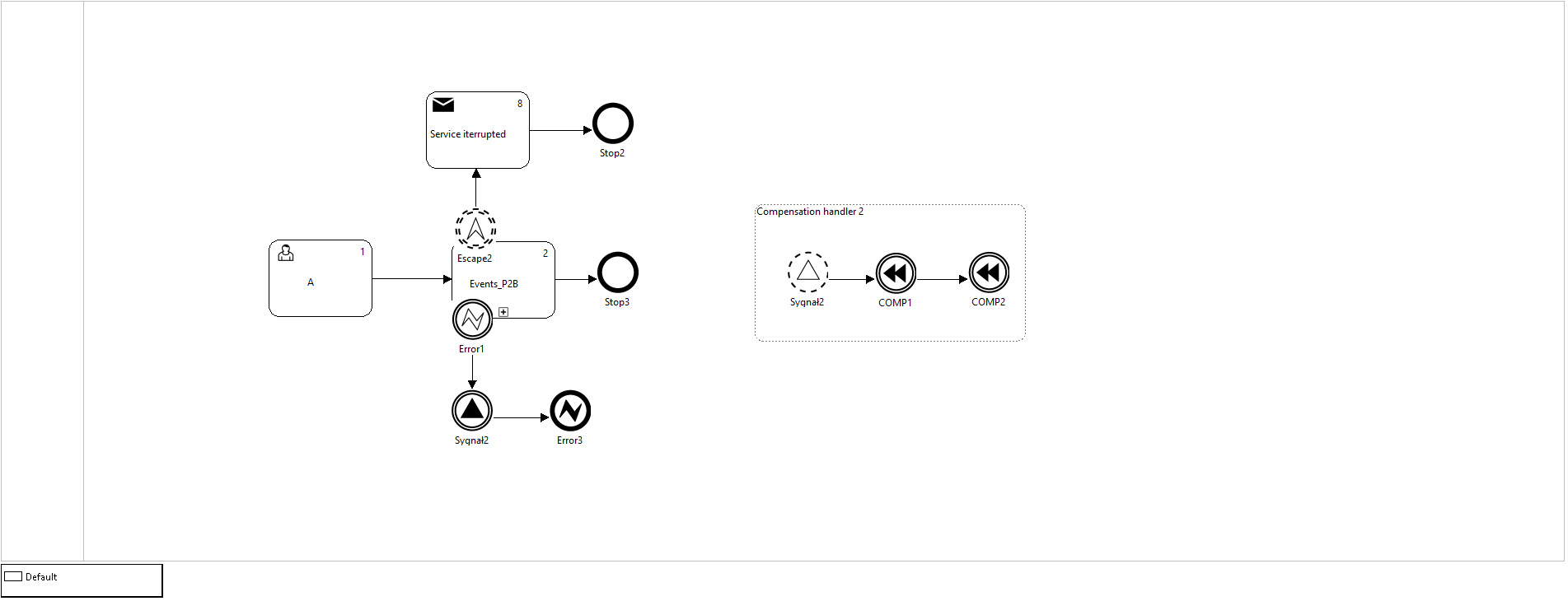
Figure 6. Higher level process definition
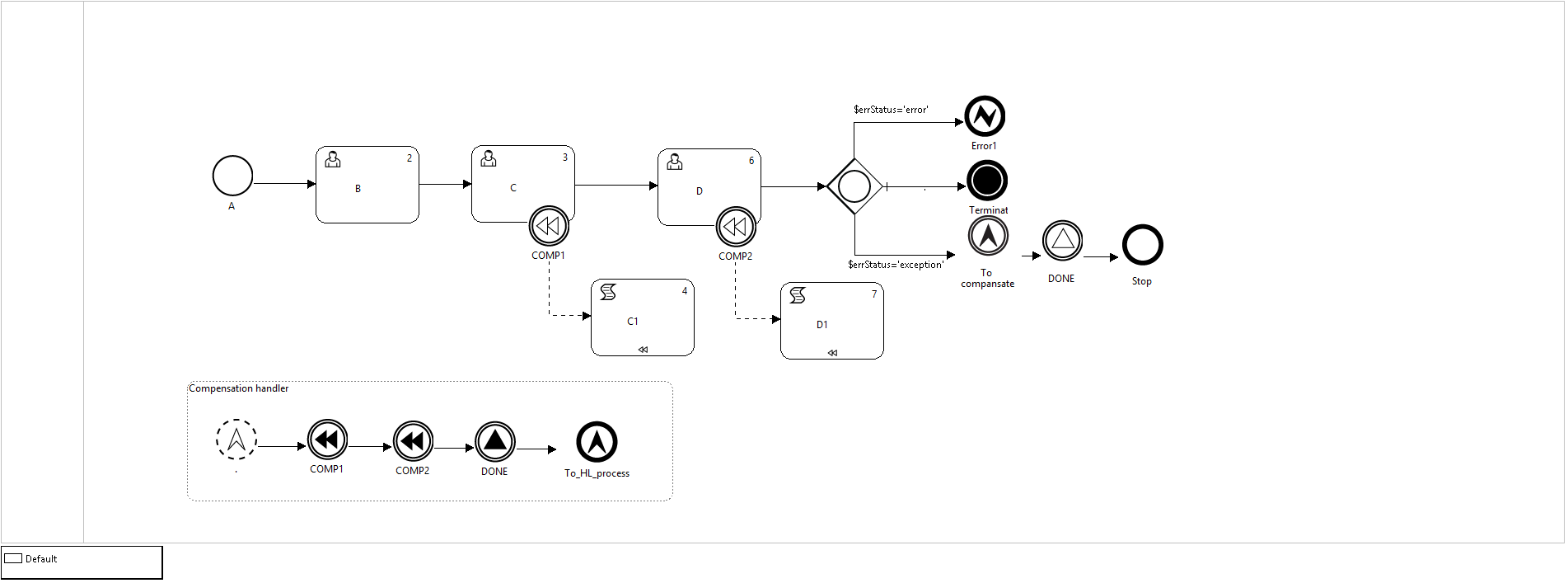
Figure 7. Definition of the sub-process comprising compensated tasks
In the second case ( Figure 10 and Figure 11 ), the exception handling consists in qualifying the result of task D as an error and handling the return to the parent process by the End event Error caught in the parent process by an Error boundary event with corresponding parameters. Interrupting boundary events stop the execution of the task (subprocess) and through the exception flow pass the token to the intermediate throwing event Signal whose target event is the non-interrupting Start event of the Signal Event- driven subprocess “Handling compensation”. Two intermediate events throwing Compensation are executed, triggering the compensation activities in the subprocess, and passing the token through a normal flow to the next task (no. 25). Finally, the higher-level process instance is terminated by executing the End Error event.
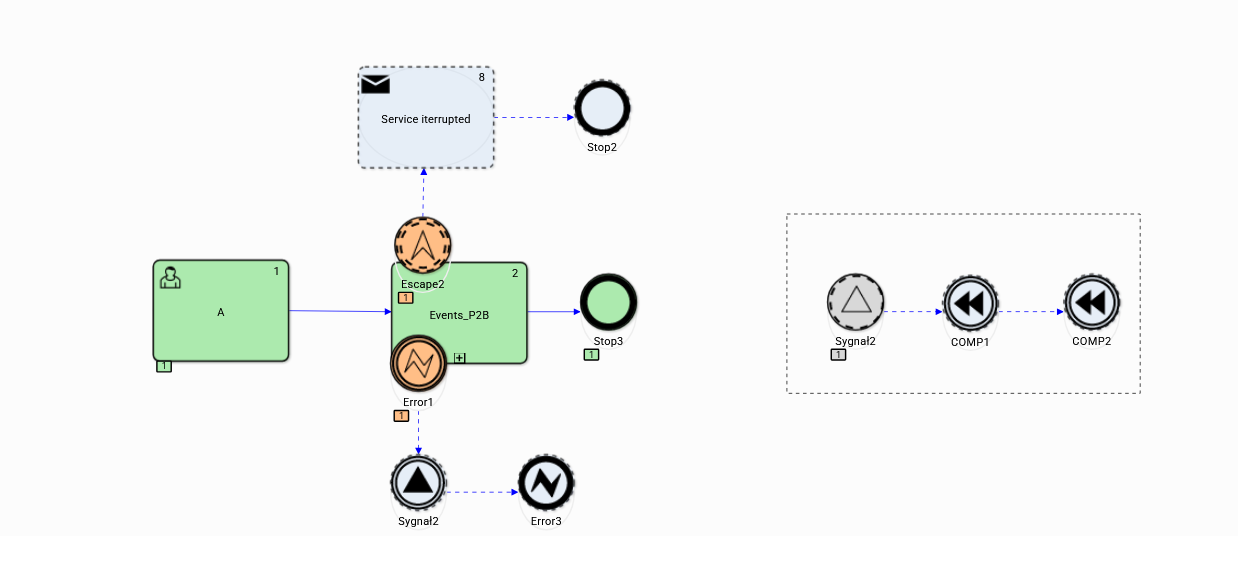
Figure 8. Expected top-level process path (variant 1)
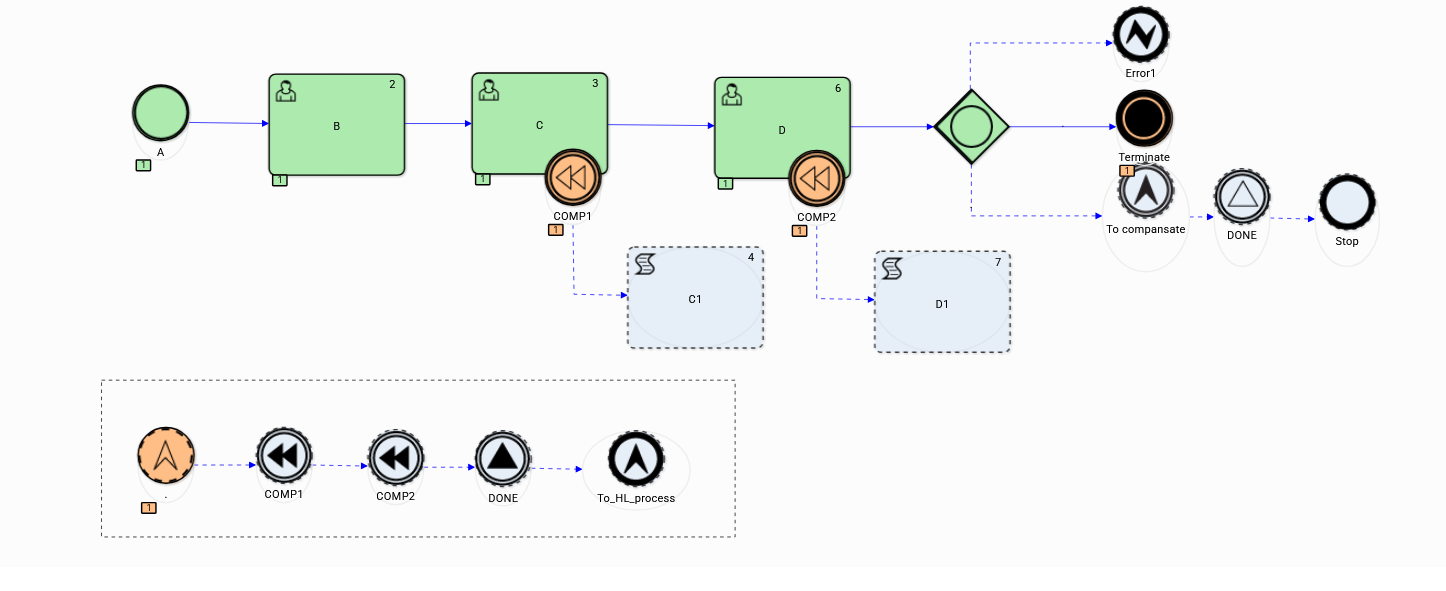
Figure 9. Expected subprocess path (variant 1)
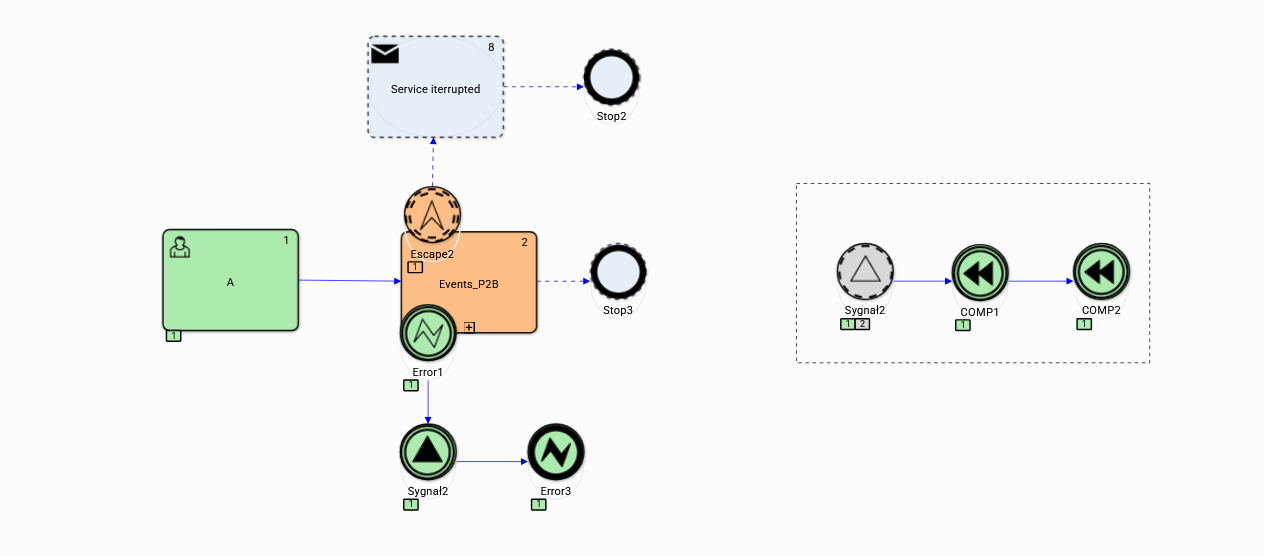
Figure 10. Higher level process execution history (variant 2)
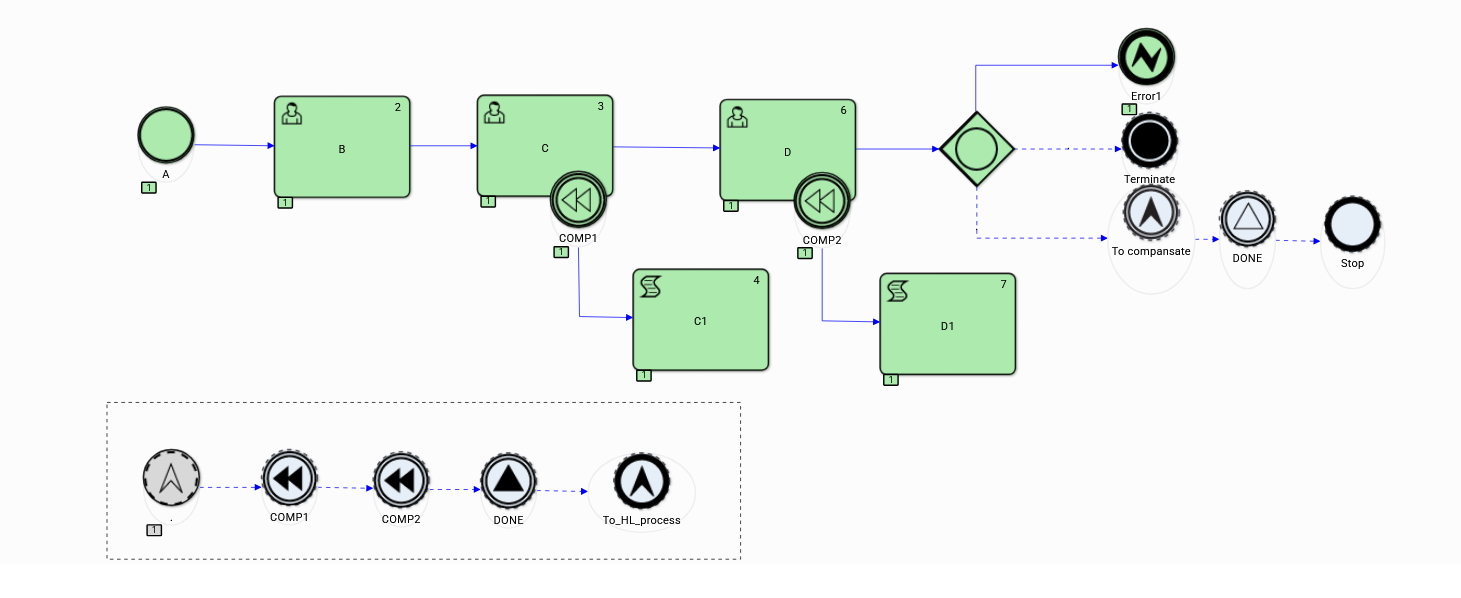
Figure 11. Execution history of the subprocess covering compensated tasks (variant 2)
In the third case supporting the idempotent behaviour of the subprocess (Figure 13) the compensation of tasks C and D is started by a similar subprocess controlled by the task Compensation Handling which is placed in the subprocess and the subprocess instance ends with an End event without any message. In this variant, the execution of the higher-level process ends normally and the boundary event Error is interrupted.
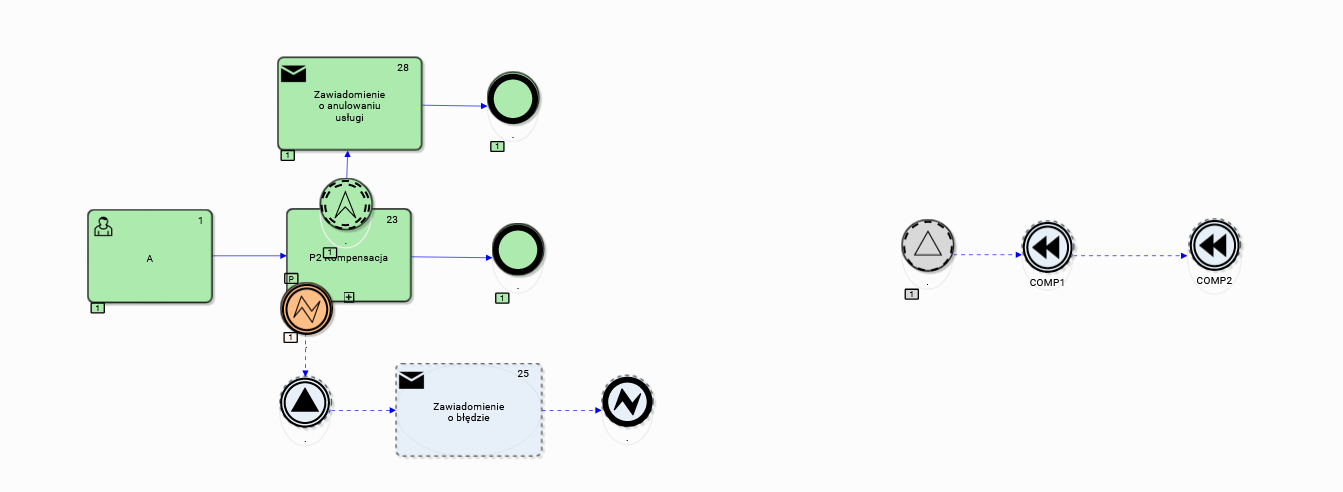
Figure 12. Higher level process execution history (variant 3)
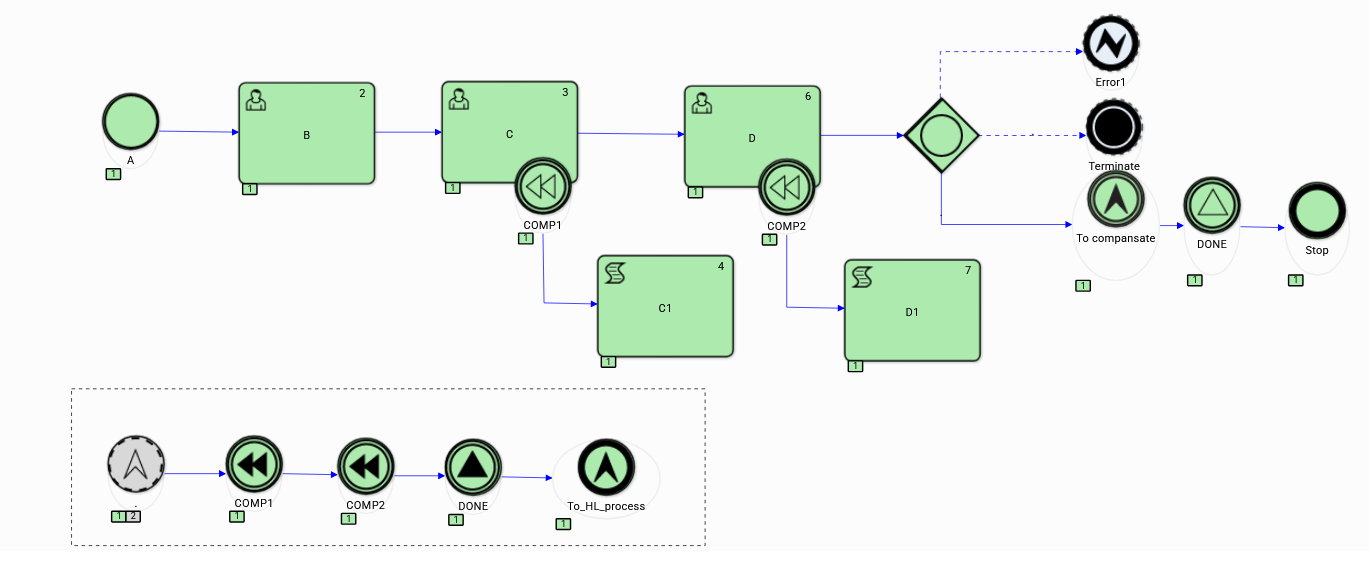
Figure 13. Sub-process execution history (variant 3)
Example 3 Boundary Events
Task execution time management allows both for detection of the occurring delays in the task execution and the opportunity of reacting in advance to the threat of delay. The latter case, which occurs many times where execution time is critical, is a preferable solution.
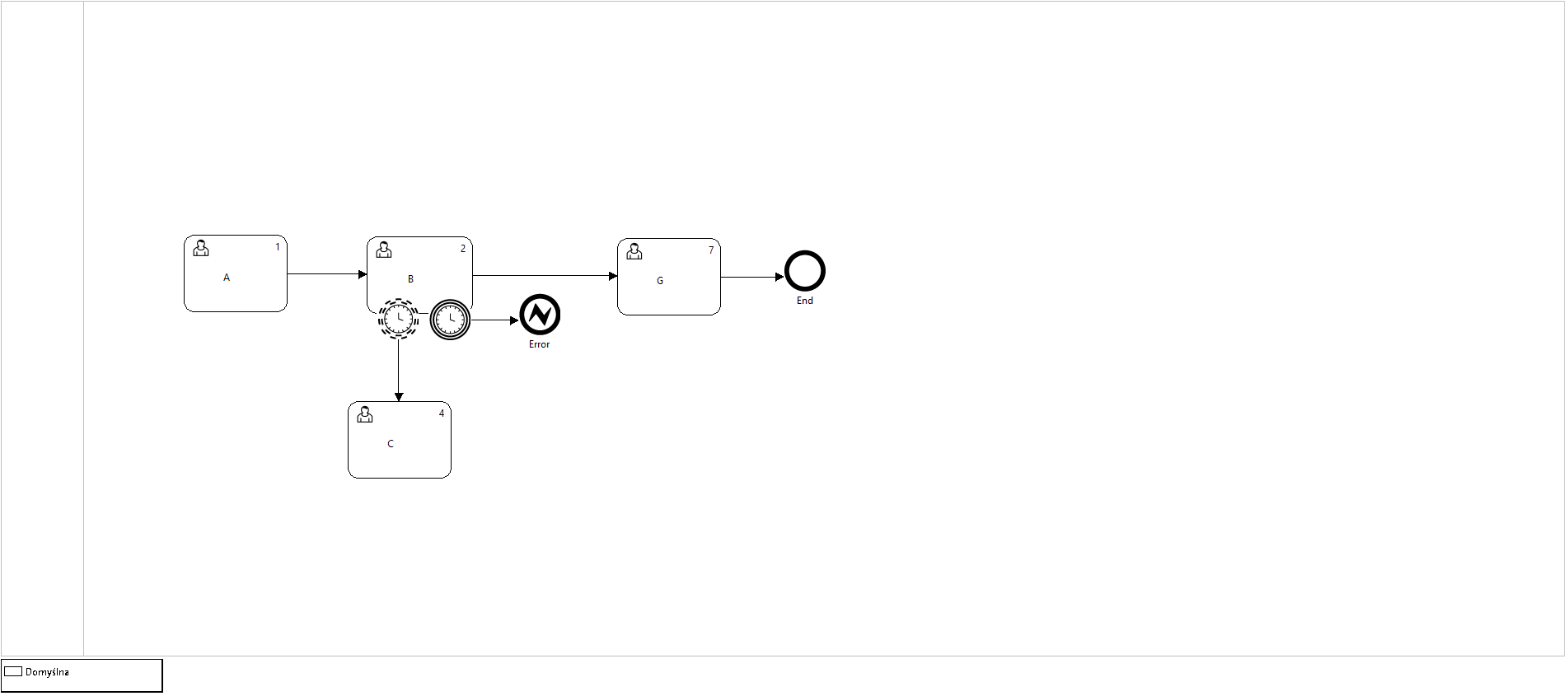
Figure 14. P3-Boundary event " Timer "
Figure 14 is an example of a model in which we use the User task with critical execution time. Exceeding this time is equivalent to failure of task instance execution leading to its immediate termination with the End Error event*.*
We can consider several probable variants of the execution of this process, which are shown in Figures 15 to 17 . In the first variant of the execution, a situation occurred in which, despite the intervention undertaken ( Task C), the supervised task was not started. This happened despite the warning transmitted to task C by the non-interrupting boundary tasks Timer.
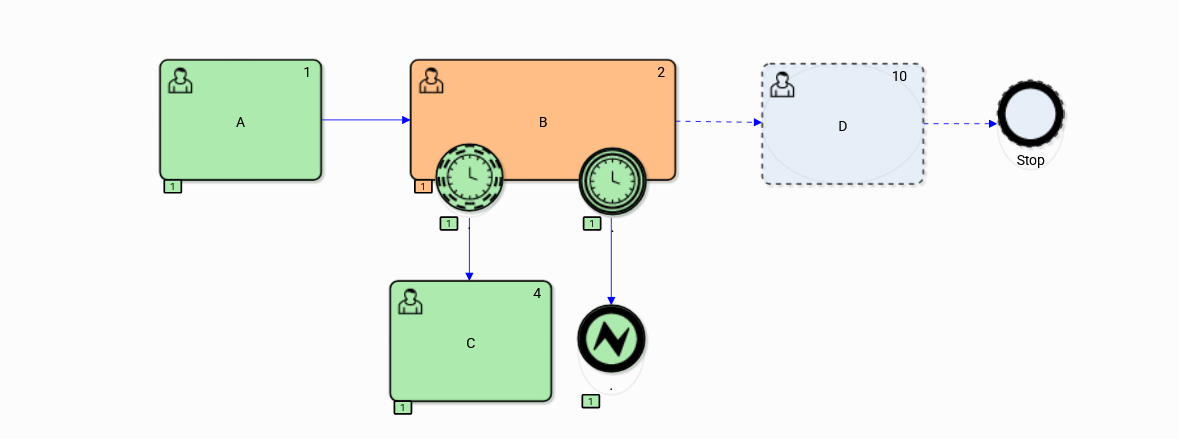
Figure 15. History of boundary event execution Timer variant 1
The passage of time caused task B to exceed the critical time limit, which resulted in the token being passed through the exception flow to the End Error event terminating the process.
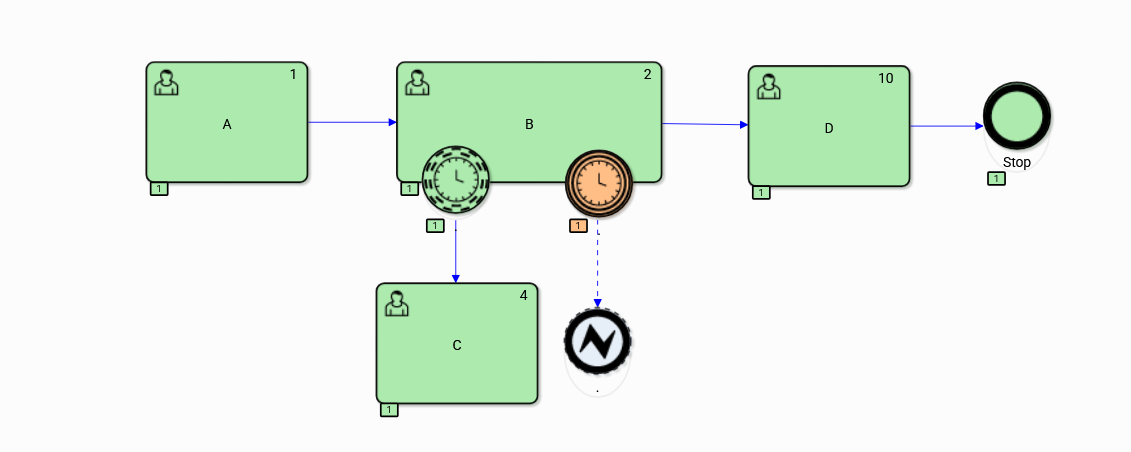
Figure 16. History of boundary event execution Timer variant 2
The second variant of the process execution ( Figure 16 ) was supposed to pass a warning about a potential violation of time constraints by the non-interrupting boundary event Timer to task C, where successful preventive actions were taken. As a result, task B continued and avoided a critical delay, and the process ended normally.
Also in the third execution variant ( Figure 17 ) the process finished normally following the expected path because none of the “ Timer ” boundary events supervising the execution of task B were timed out.
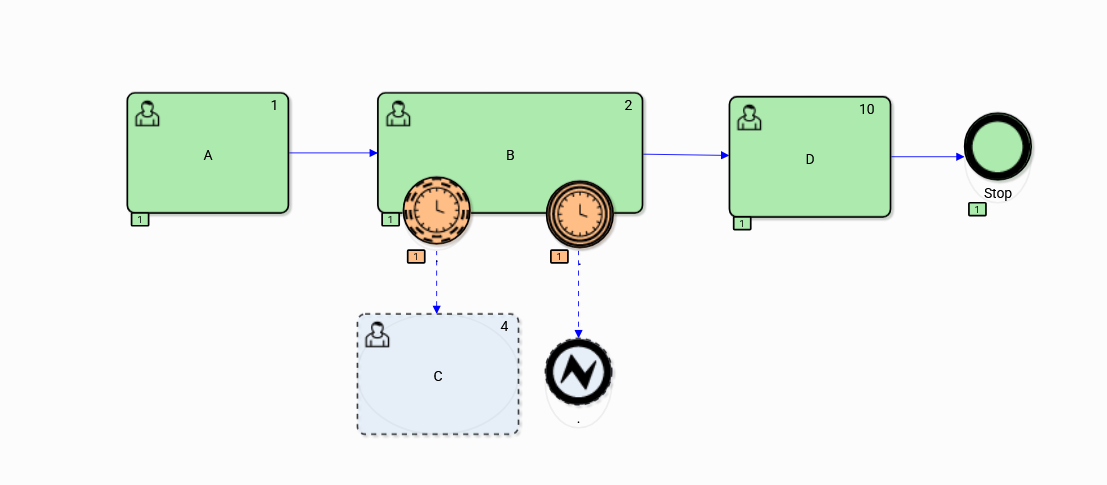
Figure 17. History of boundary event execution Timer variant 3
Example 4 Event-Driven Subprocess
An example of a process model with an Event-driven subprocess is shown in Figure 18. The process performs User tasks A and B and, if the condition is met the token is passed, and it ends via the expected path with the End event. The introduction of Condition events named Condition1 and Condition2 to the process graph allowed for manual control of the process flow.
Event Condition1 is the non-interrupting Start event of the Subprocess “Escalation evaluation” and is set to true by the BPQL expression available within the process monitoring mechanism. Event Condition2 is set at startup of the process instance as a parameter. To allow going to the end of the path after task B has been executed, the value of the Condition2 event was set to true.
The process was executed in two steps; step1 ( Figure 19 ) is the execution of the expected process path. The process was terminated successfully and the execution data, important for showing the timing of the process activities, was shown for the End (Stop) event. In this step, the process followed the expected path, which was terminated by the End event.
After the expected process path was completed, the process result was considered to be incorrect and step2 was executed by running the Subprocess driven by the condition ( Condition1 ). The Subprocess contains, in addition to task D, an intermediate event throwing Compensation triggering compensating activity C reversing the results of task B. The process instance was terminated by an End event throwing Error.
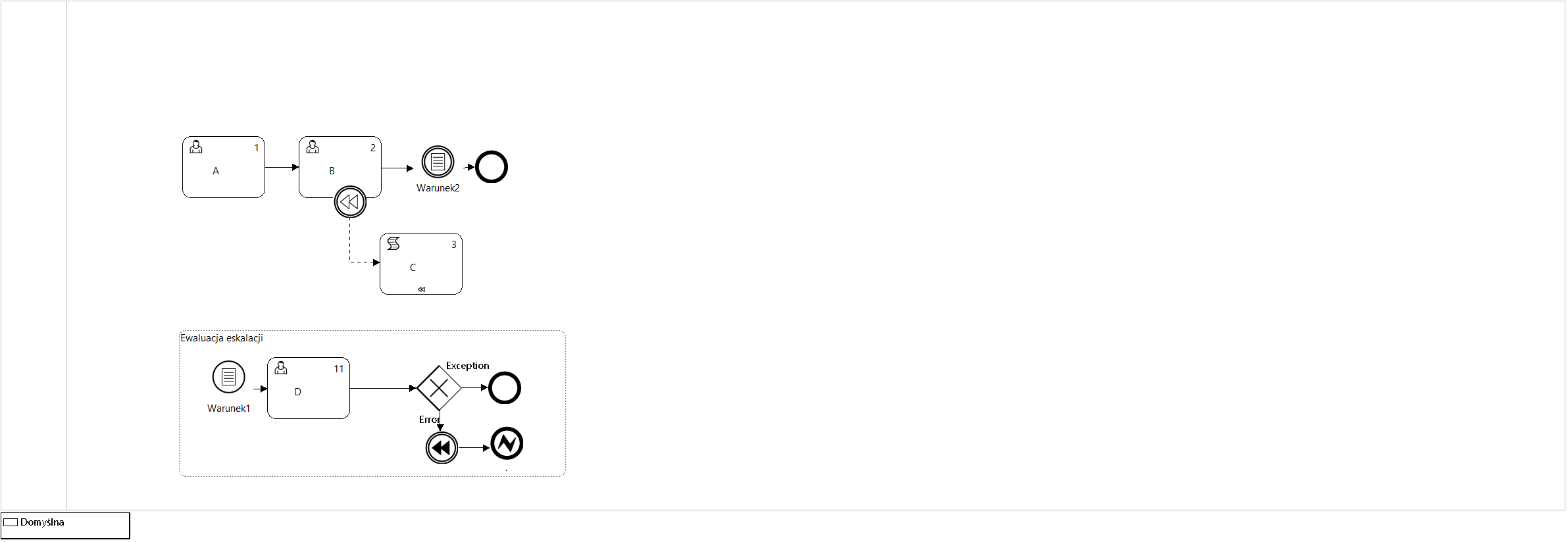
Figure 18. Process definition with condition-driven subprocess and compensation
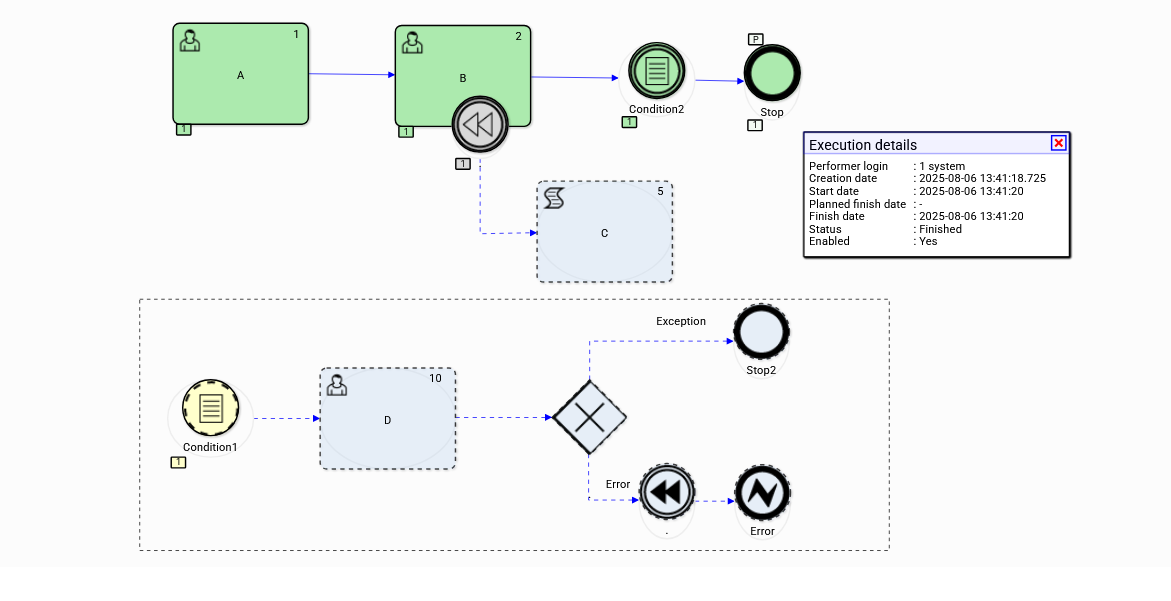
Figure 19. Process execution ( Figure 18 ) – step 1
Figure 20. Process execution ( Figure 18 ) – step 2
Event-driven subprocesses ( Event subprocesses ) are intermediately related to the process flow structure and are modeled as an independent process subgraph starting with one of the allowable Start events. Start events can initiate the execution of subsequent tasks concurrently to the main process graph from which they were called. Another type of subprocess Start events are interrupting events, the occurrence of which interrupts the processing in all other process paths.
Once the processing of an Event-driven Subprocess is complete, it is not possible to return to the flow structure of the surrounding process. The Subprocess is closed by an End event that throws to an intermediate boundary event of the surrounding Process/Subprocess. The example model shown in Figure 21 contains the expected process path as a series of tasks A,B or A,B,E in case of an exception, where the result of task B can be reversed by a compensating activity C.
Non-interrupting Event-Driven Subprocess Escalation contains one task (D) and can end with either an End Error event or an End event (a NONE event).
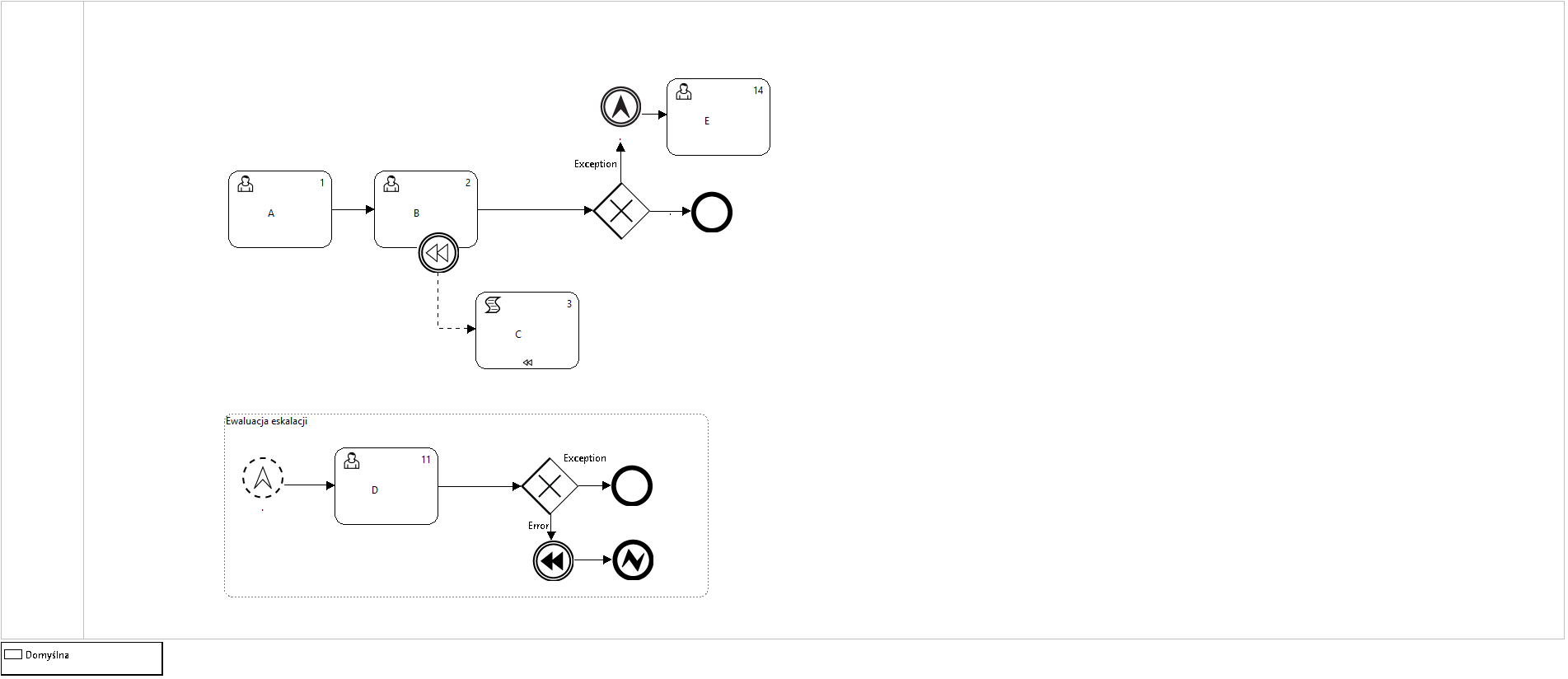
Figure 21. The process of including event-driven subprocess
The history graph of the process execution shows the processing of path A B E and task D in the Escalation Evaluation subprocess, which ended with the reversal of the result of task B and an error being thrown.
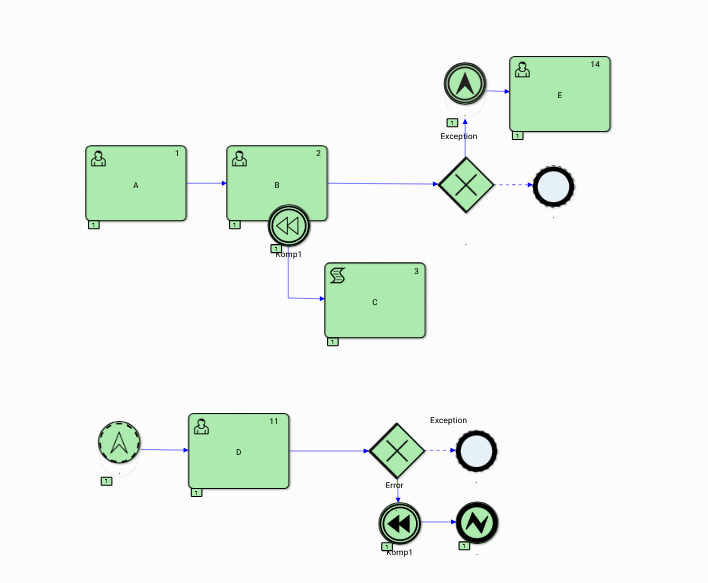
Figure 22. Escalation event handling
Example 5 - Iterations
The case of iterative control of the process path execution refers to the Event-driven Gateway, presenting the features of iterative use of such an element of the process model. In defining the gateway, all types of intermediate throwing events and their corresponding intermediate catching events can be used*.* Figure 23 presents a process model containing an event-driven gateway executed iteratively (in this case there are two iterations) and Figure 24 illustrates the history of execution of this part of the process.
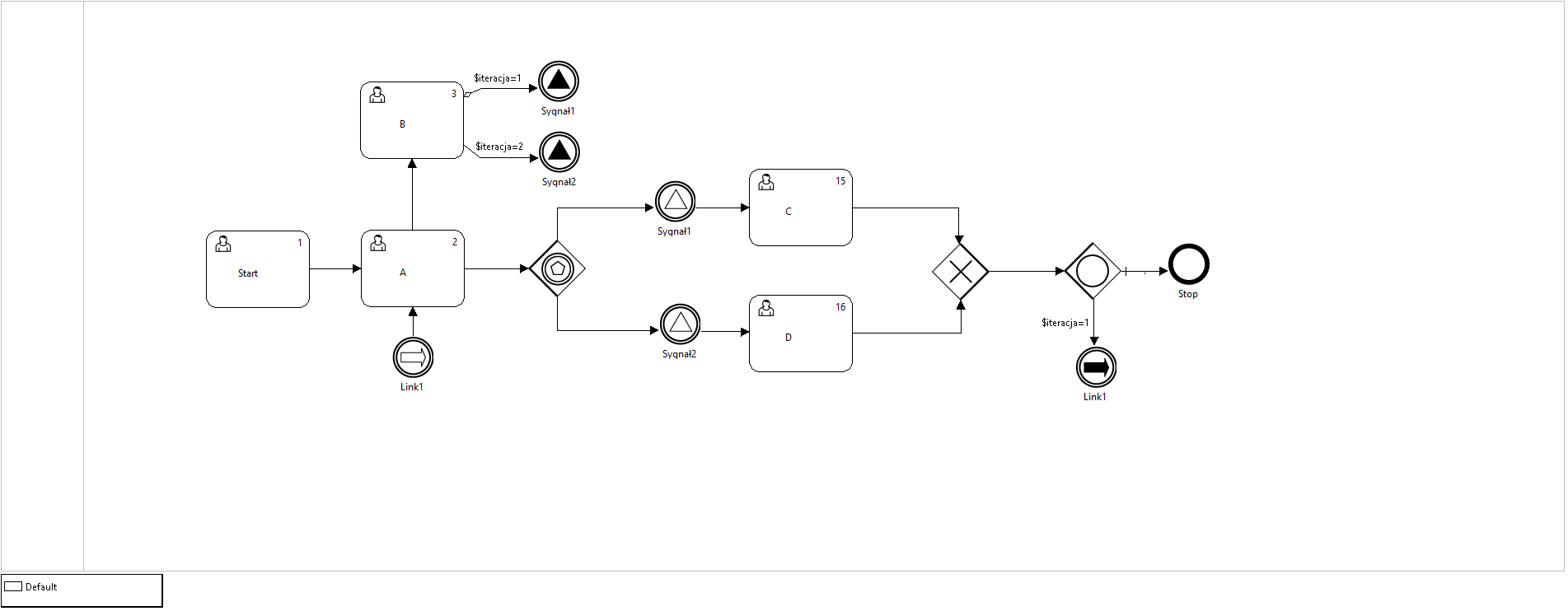
Figure 23. The process model of iterative path control of the process graph
Two alternative executions of a fragment of the process graph are modeled within the iterations, comprising tasks C and D, triggered by pairs of Signal events respectively*.* The path of the iteration depends on the successively triggered throwing events, and the selection of the event depends on the setting of the value of the global process variable $iteration. It is easy to see that the model is divided into two subgraphs, one constituting the expected process path including tasks <Start, A, C|D> and the other controlling the execution of the iteration through events.
Such a design pattern, coupled with the use of process execution rules created based on BPQL and the process semantic model available within the process ontology ( Topic Maps), may be used to control the execution of any type of a project plan by appropriate mapping of its schedule (Gantt chart) to a process graph.
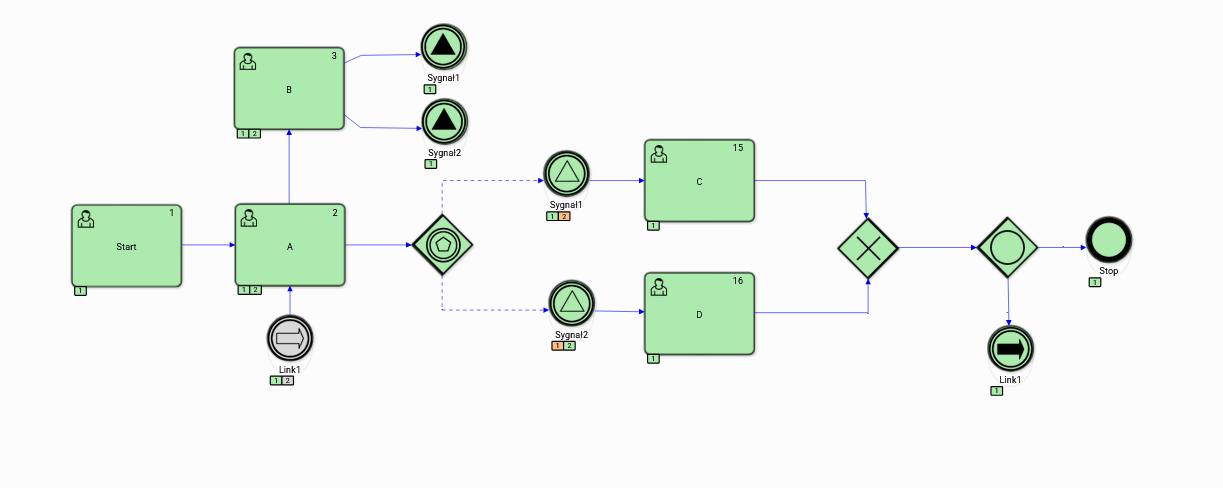
Figure 24. Execution history of the iterative path selection process
Example 6 - Group work
An example of group work can be the procedure of creating and publishing the results of scientific papers, typical for the management of research processes. Maintaining the required quality of scientific papers depends not only on the authors of the papers, because in the subsequent stages of the publishing process other people are involved, acting in various specialized roles.
The publishing process model, presented in Figure 25 , automates the coordination and supervision of the cooperation of the publication authors with the reviewers, technical editors and the responsible author making the end decision on the publication of the work.
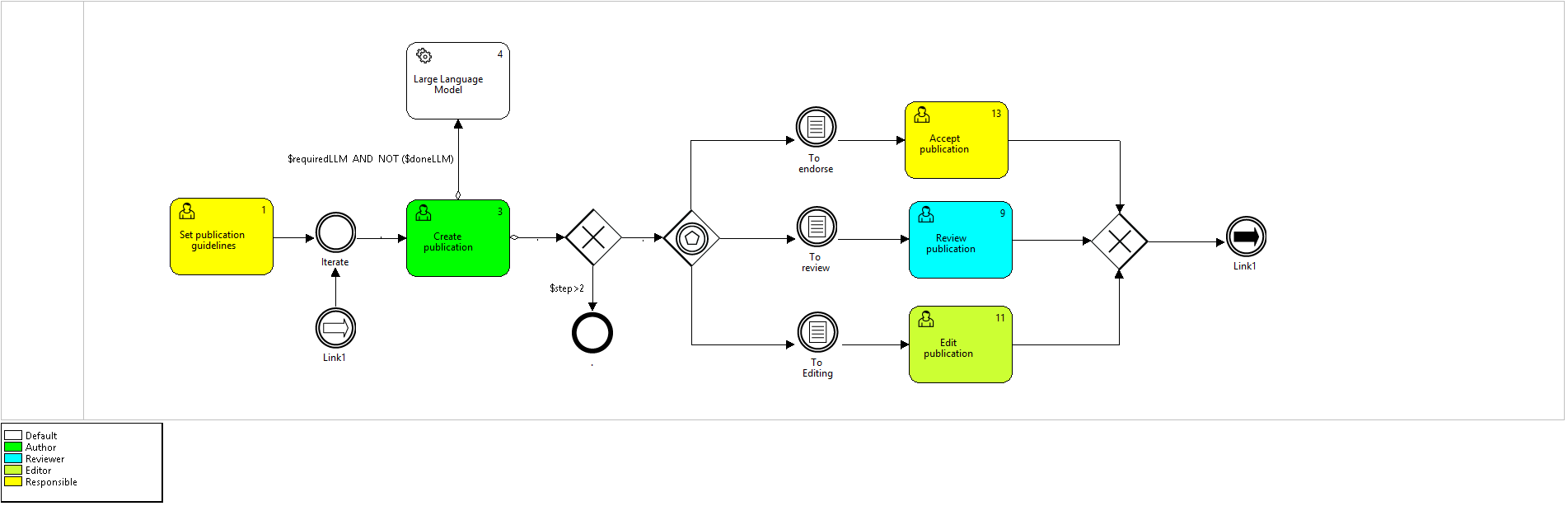
Figure 25. Model of the group work control process – the “ Publication Groupwork ” procedure
The publication of scientific papers, although governed by strict rules of procedure resulting from the general principles of cooperation between specialists acting in various roles, always proceeds according to the adopted methodology which imposes, among other things, the order in which its individual tasks are to be performed.
An additional dimension of coordination is the need to select people representing the appropriate domain knowledge for individual roles, such as the Reviewer or the Responsible. Here, the docuRob® WorkFow platform is supported significantly by the network of connections between people collaborating in research projects. Such a model of connections is an element of the ontology of the publishing process modeled based on the Topic Maps notation in the docuRob® Ontology Manager module.
Maintaining the order of execution of individual Tasks is automatic and it proceeds in accordance with the designed process. Under the symbols of Condition events on a green background*,* we have numbers indicating the order of occurrence of individual events.
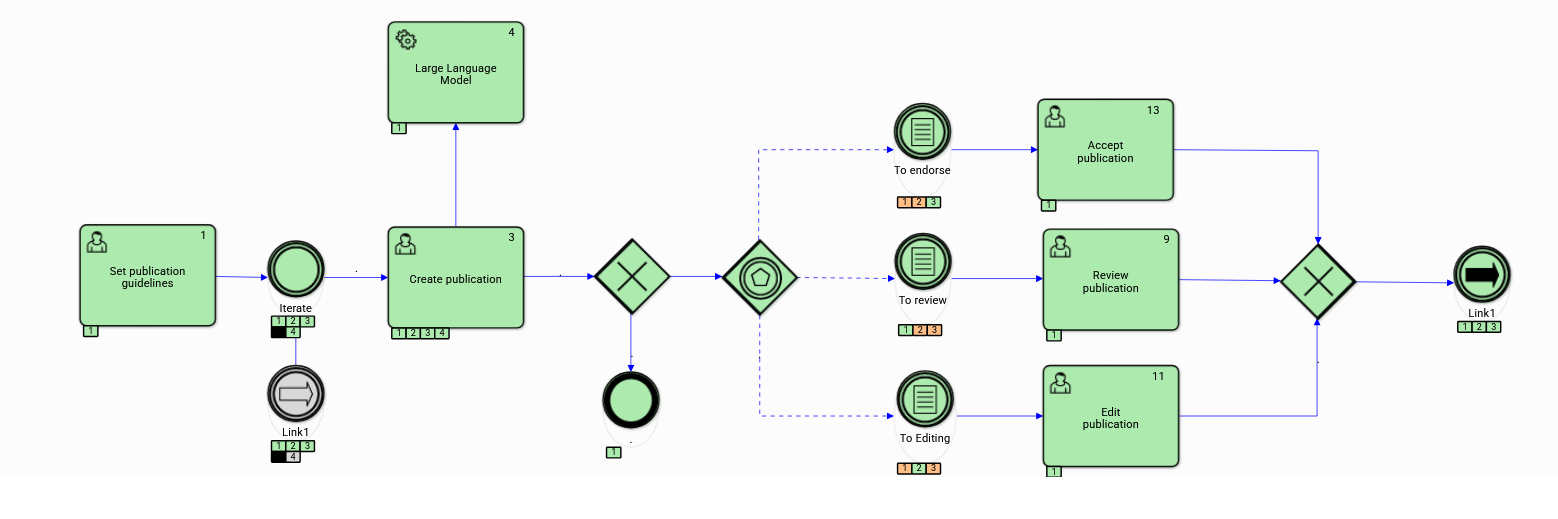
Figure 26. Group work process history graph
It is also feasible to introduce an additional dimension of automation by integrating the process with the LLM (Large Language Model) system, supporting work at the stages of its creation and evaluation. The ability to control the availability of support with the LLM model results from a decision modeled by an appropriate condition defined for the flow form the Create publication Task passing the token to the automatic activity integrating the LLM system with the publishing process.